Announcement

Collapse
No announcement yet.

สาย USB มีผลมากไหมครับ

Collapse
X
 
  • Filter
  • Time
  • Show
Clear All
new posts

  • สุดยอดกระทู้นี้

    จากเรื่อง USB ไป HDMI ไปๆมาๆ SATA และ IDE

    -0-

    INTELLIGENCE

    Comment


    • Originally posted by ManiacMaew View Post
      ออกทะเลต่อ
      เคยนั่งเทียบเสียง เพลงเดิมไฟล์เดิม จาก HDD กับ ไรท์ลงcd อยากจะบอกว่าแยกไม่ออก
      ดีแล้วครับ

      มีความสุขได้โดนไม่จ่ายหนัก

      ผมก็เหมือนกัน 555

      Comment


      • 555 นั่นดิ ใครพาไปเรื่องอื่นหว่า

        Comment


        • Hot จริงๆ 12 หน้าแล้ว

          ขอกลับมาเรื่อง USB ต่อนะครับ มีผลกับเสียงหรือไม่อันนี้ผมเองไม่ทราบได้ เพราะไม่มี Device sound ที่เป็น USB แต่มีแผนที่จะจัดอยู่

          เรื่องที่ 1 ถามว่าท่านที่ใช้ DAC ต่อแบบ usb นั้น Windows มันมองเป็น sound device ตัวหนึ่งเลยใช่หรือไม่?

          เรื่องที่ 2 คุณ maxxx77 ครับ เคยเห็นแว๊บๆว่ามี iMac 27" ใช้อยู่ด้วย อยากถามว่า เคยเสียบ DAC แบบ usb เข้าไปหรือไม่? แล้วมันเห็นเป็น sound device ตัวหนึ่งไหม? (ผมใช้ Apple OSX อยู่ด้วย)

          เรื่องที่ 3 ไม่ทราบว่าเคยลองทดสอบไหมครับว่า ระหว่าง MS Windows vs Apple OSX ใช้โปรแกรมเดียวกัน (เอาเป็น iTunes แล้วกัน) บนเครื่องเดียวกัน แล้วส่งสัญญาณเสียงแบบ digital -> usb -> dac นั้นให้ความรู้สึกของเพลงที่แตกต่างกันหรือไม่?

          ขอบคุณครับ
          เรื่อง 1-2 นั้นเป็นข้อมูลเพื่อหา DAC มาใช้งานบ้าง
          เรื่อง 3 นี้ถ้าความรู้สึกของเพลงต่างนี้นั้นแสดงว่า OS ก็มีผลกับการ process ด้วยนอกจากโปรแกรม player

          Comment


          • ช่วงนี้ตอบช้า เพราะเนทที่บ้านไม่ค่อยดี Cable internet ของTRUE ห่วยจริงๆ เช้าๆดี ค่ำๆล่มตลอด ต้องมาแอบตอบที่ทำงาน ^^"

            การประมวลผลด้วย CPU ในการอ่าน file เพลงขึ้นมา ไม่มีการเดา (interpolate) ข้อมูลที่อ่านขึ้นแน่นอนครับ ตรงนี้กำหนดในมาตรฐานเลยก็ว่าได้ ส่วนการ correction ด้วย ECC ไม่ใช่การเดานะครับ ที่เปลือง CPU ต่างกันก็แล้วแต่ว่าhardware นั้นๆมีส่วนประมวลผลด้วยตัวเองหรือเปล่า เพราะต้องใช้ในการจัดการข้อมูลหรือปรุงแต่งเสียง ไม่ใช่ในการเดาข้อมูล แล้วข้อมูล digital ก็วิ่งในรูปแบบ digital จนถึง DAC นั่นแหละ(เช่น DAC ในsoundcard, ใน DAC ภายนอก หรือใน AVR) แต่ก็อย่าลืมว่ามันอาจโดนปรุงแต่ง ด้วย driver ของ soundcard ก่อนไปที่ DAC ก็ได้ (เช่นพวก EAX ของ creative หรือแม้แต่การ re-sampling ใหม่จาก 44.1KHz > 48KHz ก็ถือว่าเป็นการปรุงแต่งเช่นกัน)

            ประเด็นโปรแกรม อ่าน file แล้วเสียงสะดุด มีหลายส่วน ทั้ง HDD ทำงานช้า buffer ของโปรแกรมที่จองไว้บนแรมน้อยเกินไป ซึ่งก็อาจแก้ไขง่ายๆด้วยการเพิ่มbuffer ของโปรแกรมนั้นๆซะ(แล้วแต่โปรแกรม) หรือแม้แต่ตัวโปรแกรมจำพวก ASIO ทำงานได้ไม่ดี (เคยเจอกับ ASIO4ALL) แต่ไม่เกี่ยวกับระบบการเดา(interpolate)นะครับ แต่ว่า ไม่ว่าจะ foobar หรือ cplay มันก็ read file จาก HDD แล้วเก็บไว้บนแรมที่ตัวเองจองไว้เหมือนๆกัน(เพราะการ read คือการอ่านจาก HDD ไปเก็บไว้ memory ซึ่งก็คือ RAM อยู่แล้วนั่นแหละ ไม่มีการอ่านตรงโดยไม่ผ่าน RAM ครับ) แต่อาจแตกต่างกันตรงกระบวนการของโปรแกรม หรือการจอง buffer บนแรมไว้สำหรับการแปลงข้อมูลมากน้อยแตกต่างกันครับ ตรงนี้แหละที่อาจต้องพึ่งการปรับ option กันเอา

            ส่วนประเด็นการตรวจสอบข้อมูลในแง่ของการทำ Error correction เท่าที่เคยถกกับคุณ kaeng มาแล้ว และยก spec กันมาแล้ว ถ้าเป็น USB DAC จะไม่มีการตรวจสอบข้อมูล ถ้าเป็น HDMI ส่วนภาพจะไม่มีการตรวจสอบข้อมูล แต่ HDMI ส่วนเสียงจะมีการตรวจสอบด้วย BCH ECC ครับ

            ส่วนการส่งข้อมูลผ่าน HDDไม่ว่าจะเป็น PATA(IDE) หรือ SATA นั้นมีการตรวจสอบข้อมูลหลายชั้นครับ ตั้งแต่ชั้น hardware ที่ทำตั้งแต่การประมวลผลจากสัญญาณที่ได้บนหัวอ่าน(ค่า error พวกนี้ปกติเยอะมาก เป็น raw error rate แต่ส่วนใหญ่แก้ไขได้หมด จนระดับ OS ไม่รู้ถึงความผิดพลาดนั้น) จนถึงระดับ OS ที่ตรวจสอบด้วย file allocation แบบต่างๆครับ ที่น่าสนใจคือการส่งข้อมูลแบบอนุกรมบน SATA ใช้การทำ 8b/10b encoding เหมือนกับการส่งแบบภาพใน HDMI (ตรงนี้ทำเพื่อเพิ่ม speed ในการส่งและลดความเสี่ยงในการผิดพลาดของข้อมูลแบบต่อเนื่อง) แต่ทั้งนี้ทั้งนั้น การส่งแบบ real-time จะไม่มีการ request ให้ส่งข้อมูลใหม่ครับ ดังเช่นที่เคยยกตัวอย่างไป ข้อมูลภาพเสียหายก็อาจจะเห็นเป็นจุดๆ dead ขึ้นบนจอเลย ส่วนเสียง HDMI ก็จะ disconnect ไปชั่วคราว แต่ถ้าเป็นการส่งแบบ HDD interface อันนี้จะ retry ไปเรื่อยๆจน timeout ถึงจะบอกว่าข้อมูลเสียอ่านค่าไม่ได้ครับ (ที่เคยเจอบน Windows ก็จะเด้งมาบอกว่า cyclic redundency check error) ส่วนสาย SATA ถูกๆแพงๆไม่มีผลแตกต่างกัน ยกเว้นไปเทียบกับสายที่"เสีย" (แบบเสียบแล้วมองไม่ค่อยเห็น HDD หรือส่งข้อมูลได้ช้าแบบผิดปกติไปเลย)

            #Maxx77
            ประเด็นเรื่องคาลิเบรทจอ ก็ตรงๆอยู่แล้วล่ะครับ งานที่ต้องการความถูกต้องสูง ก็ต้องมีการสอบเทียบ ซึ่งถ้าใช้สายแถมในการสอบเทียบการแสดงผลของจอได้ ก็แสดงว่าสายแถมมันก็ต้องส่งข้อมูลได้ 100% อยู่แล้วใช่ไหม โรงพิมพ์ถึงยังใช้เป็นมาตรฐานขั้นต่ำได้เลยนี่นา? ถ้าสายแถมมันทำให้ส่งข้อมูลผิดพลาดบ่อยๆ(แบบที่บางคนบอก) ต่อให้ทำคาลิเบรทไปก็ไม่ได้ผลอยู่ดีจริงไหม?

            หรือถามง่ายๆว่า คุณได้ซื้อสายต่อ DVI ราคาหลักหมื่น เพื่อใช้กับ workstationในการทำงานของคุณไหม? ถ้าไม่ก็แสดงว่าคุณก็ยอมรับอยู่แล้วว่าสายแถมมันเพียงพอต่อการทำงานมืออาชีพอยู่แล้ว ส่วนสายเครื่องเสียงเป็นเรื่องของรสนิยมและความสุนทรี ที่อาจเกิดจากการเบี่ยงเบนอย่างตั้งใจของผู้ผลิตสาย หรือแม้แต่ภาพลักษณ์ความเป็นพรีเมียมแบรนด์ ที่ทำออกมาแล้วถูกใจผู้รับชม ฉะนั้นมันก็จะ contradict ย้อนกลับไปได้ว่า สายแถมก็ส่งข้อมูลได้ 100% อยู่แล้วนั่นเองจริงไหมล่ะครับ?

            ส่วนคนมีเงินจะซื้ออะไรสนองความต้องการ ก็เป็นเรื่องของความพึงพอใจ แต่ไม่มีใครรับรองว่าความพึงพอใจนั้นจะมีพื้นฐานจากความถูกต้องในทางวิทยาศาสตร์สักหน่อย อย่างเจ้าของบ.หมื่นล้าน จ้างซินแสครั้งละสองแสนจนถึงล้านบาทมาดูฮวงจุ้ย คุณคิดอย่างไร? บางคนบอกเขาเชื่อพวกนี้เขาเลยรวย(ตอนเขาเป็นบ.เล็กๆ เขากล้าจ้างซินแสราคาแพงมาไหมล่ะ?) หรือว่าเขารวยแล้วเขาเลยเชื่อเรื่องพวกนี้(แบบว่าเงินเหลือเฟือ เลยเอาเงินไปอุดความเป็นไปได้ทุกกรณี แม้จะพิสูจน์ไม่ได้?) ซึ่งจริงๆสิ่งที่ซินแสทำก็ไม่ต่างจากที่สถาปนิกปัจจุบันเรียนกันมาสักเท่าไร ด้วยซ้ำ ฉะนั้นถ้าถามว่าเจ้าของโรงพิมพ์จะคิดอย่างไร ผมว่าก็คงไม่ต่างจากคนที่จ้างซินแสสักเท่าไรนักหรอกครับ คือเขาเชื่อว่าคุ้มค่านั่นแหละถึงทำ แต่คุ้มค่าจริงๆบนพื้นฐานทางวิทยาศาสตร์หรือเปล่า ต้องพิสูจน์กันอีกที คนเราไม่มีใครโง่ใครฉลาด มีแต่รู้กับไม่รู้ครับ

            และอีกนิด การทดลองใดๆ โดยส่วนตัวเลือกที่จะลองโดยกำหนดตัวแปรที่ตัวเองสามารถควบคุมได้ หรือมองแล้วว่ามีข้อมูลสนับสนุนทางวิทยาศาสตร์มากพอที่น่าจะสนใจลอง เราคงไม่จำเป็นต้องทดลองเรื่องที่เราสงสัยไปทุกเรื่องโดยไม่คิดก่อนว่าเป็นไปได้แค่ไหน เพราะงบประมาณและเวลามีจำกัดครับ สมัยวัยรุ่นผมก็ไปลองมาในเรื่องอื่นๆที่เป็นความเชื่อกันเยอะ ไปพิสูจน์บ้านผีสิงกับเพื่อนก็เคย(อันนี้ไปขำๆ นึกถึงตอนนี้น่ากลัวไปได้ไง กลัวโจรปล้น -_-") แต่ถ้าให้เดี๋ยวนี้ทำแบบนั้นอีก คงไม่ไหวครับ ยกเว้นว่าจะมีข้อมูลสนับสนุนใหม่ๆที่น่าสนใจจริงๆ แต่ให้แบบใช้แต่ศรัทธาไปลอง ใช้ความรู้สึกที่เบี่ยงเบนง่ายสุดๆไป อันนี้คงไม่ไปครับ

            #xexalskyline
            การส่งภาพในระบบ DVI/HDMI ส่งเป็นข้อมูลต่อ pixel นะครับ ถ้าผิดพลาด 1 ชุดก็ทำให้เกิดความผิดพลาดได้ 1 pixel เท่านั้น ไม่ได้เกิดเป็นเฉดสี ถ้าจะเกิดเป็นเฉด หรือโทนทั้งภาพ นั่นแสดงว่าข้อมูลทั้งสองล้านชุดในเฟรมนั้นๆ(กรณี 1080p ~2Megapixel) ต้องผิดพลาดที่ตำแหน่งเดียวกันหมด(อนุมานว่าเป็นภาพสีเดียวกันล้วนๆด้วย) ลองคิดคำนวนง่ายๆเอาเอง ว่ามันเกิดขึ้นได้ง่ายไหม และโอกาสที่จะเกิดขึ้นต่อเนื่องจนสังเกตได้จากภาพยนต์ทั้งเรื่องไม่ใช่แค่เสี้ยววินาที มันเป็นไปได้อย่างไร? ต้องแยกนะครับ ความผิดพลาดที่รับรู้ได้ กับความผิดพลาดที่รับรู้ได้ยากจนเรียกว่าความเพี้ยน ฟังดูคล้ายๆแต่ที่มาต่างกันเยอะ

            ส่วนประเด็น SPIDF สลับขั้วกันขอติดไว้ก่อน หาเวลาไปอ่านspec ก่อนครับ ผมไม่แน่ใจว่าขั้วที่สลับกันคือขั้วของอะไรกันแน่ และมันส่งข้อมูลกันอย่างไร แต่เรื่องของ in-phase, out-phase แบบการสลับขั้วลำโพงมันไม่ใช่การสลับ logic นะครับ คนละเรื่องกันเลย

            Comment


            • หลังจากตรวจสอบแล้วว่า ข้อมูลของเบอร์นี้ครบถ้วน เอามาโพสลงในนี้เพิ่มอีก1กระทู้
              เผื่อจะเห็นไรลางๆขึ้นมาบ้าง


              ถ้าไม่มีพื้นเรื่องอิเลคทรอนิคส์ ให้ข้ามรายละเอียดตัววงจรไปก่อน เพราะจะมึนแน่นอนครับ

              หลักคิดแบบง่ายๆมองเป็นภาพรวมกว้างหน่อย จะประมาณว่า
              ทรานซิสเตอร์ เฟท มอสเฟท ไอซี อุปกรณ์พวกนี้ทำหน้าที่หลักคือทำตัวเองเป็นสวิทช์ปิดเปิด
              โดยมีตัวแปรสั่งการปิดเปิดจากขาคอนโทรล(ขาอิพุท) ทรานซิสเตอร์ก็ขาB เฟท มอสเฟทก็ขาGate ไอซีก็ขาอินพุท

              ถ้าละเอียดอีกหน่อยก็จะเป็นเรื่อง นอกจากให้ผ่านได้แล้ว จะให้ควบคุมว่าให้ไฟหรือสัญญาณนั้นผ่านได้มากผ่านได้น้อยแค่ไหนด้วยหรือเปล่า


              บล็อคการทำงาน > ดูเส้นทางของสัญญาณ ดูเส้นทางของระบบไฟ > ดูว่า สัญญาณควบคุมชื่อไร สัญญาณดิจิตอลชื่อไร > ดูว่า สัญญาณควบคุมว่าไปคุมส่วนไหนของสัญญาณอื่นๆบ้าง

              เรื่องโลจิคเป็นเพียงการควบคุมสั่งให้สวิทช์ปิดหรือเปิด ถ้าเปิดจะเป็นการยอมให้สัญญาณชุดอื่นๆที่ส่งร่วมกันมา มีสัญญาณชุดไหนผ่านไปได้บ้าง

              ที่สำคัญ นอกจากดูว่ามันโลจิค0โลจิค1เพื่อใช้งานเป็นสวิทช์ปิดเปิดแล้ว ให้ดูเรื่องระดับแรงดันไฟก่อนกับหลังผ่านไว้ด้วย
              ( จะมีบางรูปบอกว่า อินพุทมีระดับไฟเท่าไหร่ ผ่านตัวแปรคั่นกลางแล้ว ระดับไฟเหลือเท่าไหร่ )
              ซึ่งเรื่องระดับแรงดันไฟที่ต่างกันของโลจิค1 จะไปมีผลในวงจรถัดไปด้วย


              คิดง่ายๆ
              อินพุทผ่านสายเข้ามา จากระดับแรงดันไฟ3.0v เจอสายดรอปไป เหลือ2.6v
              ซึ่งระดับแรงดันไฟ2.6vนี้ ยังมีปริมาณมากพอที่จะดีเทคเป็นโลจิค1 เพื่อเอาใช้งานสั่งงานสวิทช์ปิดเปิด(อินพุทของทรานซิสเตอร์,ไอซี)ได้

              แต่ปัญหามันคือไม่มีใครบอกว่า
              เจ้าระดับแรงดันไฟ2.6vนี้ หลังจากผ่านสวิทช์ปิดเปิด(อินพุทของทรานซิสเตอร์,ไอซี)แล้ว มีการปรับไฟขึ้นใหม่เป็น3.0v หรือ ยังคงเป็นไฟ2.6vเท่าเดิม
              ( มันถึงเกิดปัญหา เกิดกระทู้ถกเถียงเรื่องพวกนี้ตามมาหลายกระทู้ )

              ลองนึกดูดีๆ ระดับแรงดันไฟ2.6vกับไฟ3.0v ถ้าเอาไปจ่ายให้หลอดLED คิดว่ามันสว่างเท่ากันหรือเปล่า


              --- เหตุและผลในส่วนนี้ จะมีผลกับระบบUSB, S/PDIF, I2Sเหมือนกันทุกประการ ---


              --------------------------------------------------------------------


              ก็อปจากกระทู้ > โมให้"เจ๊ง" หน้า95 โพส1903


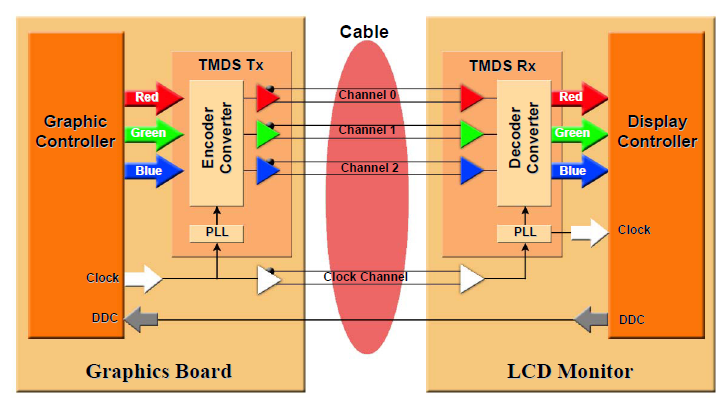
              รูปแบบการรับส่งข้อมูลTMDS ในระบบHDMI แบบปรกติ


              รูปแบบการรับส่งข้อมูลTMDS ในระบบHDMI แบบมีการปรับปรุงคุณภาพชดเชยสายสัญญาณ [Receiver chip(Cable equalization)]


              ชิบเบอร์ TMDS341 3-to-1 DVI/HDMI Switch (เบอร์นี้ มี "Receiver chip(Cable equalization)"ในตัวแล้ว)
              เวป > คลิก
              ดาต้าชีท > คลิก

              FEATURES
              • Designed for Signaling Rates up to 1.65 Gbps in Support of UXGA Display
              • Differential Interface Compatible with Transition Minimized Differential Signaling (TMDS) Electrical Specification
              • Each Port Supports HDMI or DVI Inputs
              • Isolated Digital Display Control (DDC) Bus for Unused Ports
              • 5-V Tolerance to all DDC and HPD_SINK Inputs
              • Integrated Receiver Termination
              • Inter-Pair Output Skew < 100 ps
              • 8-dB Receiver Equalization to Compensate for 5-m DVI Cable Losses
              • High Impedance Outputs When Disabled
              • HBM ESD Protection Exceeds 3 kV
              • 3.3-V Supply Operation

              APPLICATIONS
              • Switching From Three Digital-Video (DVI) or Digital-Audio Visual (HDMI) Sources
              • Digital TV
              • Digital Projector
              • Audio Video Receiver

              DESCRIPTION
              The TMDS341 is a 3-port digital video interface (DVI) or high-definition multimedia interface (HDMI) switch that allows up to 3 DVI or HDMI ports to be switched to a single display terminal. Four TMDS channels, one hot plug detector, and an I2C interface are supported on each port. Each TMDS channel allows signaling rates up to 1.65 Gbps.

              The active source is selected by configuring source selectors, S1, S2, and S3. The selected TMDS inputs from each port are switched through a 3-to-1 multiplexer. The I2C interface of the selected input port is linked to the I2C interface of the output port, and the hot plug detector (HPD) of the selected input port is output to
              HPD_SINK. For the unused ports, the I2C interfaces are isolated, and the HPD pins are kept low.

              Termination resistors (50-W), pulled up to VCC, are integrated at each receiver input pin. External terminations are not required. A precision resistor is connected externally from the VSADJ pin to ground for setting the differential output voltage to be compliant with the TMDS standard. When the output is connected to a standard TMDS termination and OE is high, the output is high impedance.

              The TMDS341 provides fixed 8-dB input equalization and selectable 3-dB output de-emphasis to optimize system performance through 5-meter or longer DVI compliant cables. The device is characterized for operation from 0C to 70C.


              ผลกระทบจากการใช้สายความยาวต่างกัน


              เดี๋ยวมีเวลา จะมาเพิ่มอีก เพราะเบอร์นี้ยังถูกนำไปปรับปปรุงคุณภาพเพิ่ม
              Last edited by keang; 14 Jan 2011, 17:27:39.

              Comment


              • ยาวทั้งคู่เลย ค่อยอ่าน - -.

                ตอบก่อน

                เรื่องที่ 1 ถามว่าท่านที่ใช้ DAC ต่อแบบ usb นั้น Windows มันมองเป็น sound device ตัวหนึ่งเลยใช่หรือไม่?
                เป็นsound deviceตัวหนึ่งเลยครับ เคยใช้อยู่ พวกpcm27xx

                Comment


                • คุณManiacMaewอ่านแล้วไม่ใช่เหรอ กระทู้นั้นผมโพสไปวันก่อนแล้วข้อมูลเหมือนกันทุกประการ เพราะ ผมก็อปจากกระทู้นั้น


                  -----------------------------------------------------------------------


                  ก็อปจากกระทู้ > โมให้"เจ๊ง" หน้า91 โพส1809
                  ก็อปมาโพสเหมือนเดิม (หากินง่ายดี)


                  ขอเตือนก่อน ว่า
                  ผมเป็นเพียงช่างเคอะริมถนนคนนึงแค่นั้น ความรู้งูๆปลาๆ เป็นคนที่เมื่อสงสัยก็จะลองค้นหาข้อมูลเท่าที่หาได้ ไม่เกี่ยงว่า จะเป็นข้อมูลแบบไหนอย่างไร เปเปอร์ก็ได้ คำบอกเล่าก็ได้ งานวิจัยก็ได้ ฯลฯ เอาข้อมูลหลายๆด้านมาเรียงร้อยตามความเข้าใจส่วนตัว
                  อันไหนที่ลองของจริงได้ก็หาโอกาสลองของจริง อันไหนที่หาของจริงไม่ได้ก็พยายามหาข้อมูลให้หลากหลายมากขึ้น

                  อย่าเชื่อในสิ่งที่ผมพูดถึงทั้งหมด เพราะ ผมไม่ใช่ผู้รู้ ไม่ใช่เทพ ไม่ใช่กูรู ไม่ใช่คนที่มีใบcerของสถาบันใดๆรับรอง พูดง่ายๆผมก็ชาวบ้านตาสีตาสาคนหนึ่ง

                  หากใครอยากรู้เรื่องที่ละเอียดขึ้น ควรหาโอกาสทดสอบข้อมูลที่ได้มา เพื่อความถูกต้องมากขึ้น


                  คำแนะนำ ในการทำความเข้าใจเรื่องการทำงานของโลจิคหรือความถี่ที่เกี่ยวข้องต่างๆ
                  โลจิคหรือความถี่ในแต่ละส่วน จะมีตัวแปรที่อ้างอิงกับCLOCK
                  โดยสัญญาณในแต่ละพอร์ทจะมีCLOCKมาเป็นตัวอ้างอิงเป็นตัวกำกับตลอดเวลา
                  หากเราเอารูปกราฟต่างๆมาเรียงกันโดยให้มีฐานเวลาตรงกัน เช่น 1วินาที, 1นาที จะช่วยให้เห็นภาพและเข้าใจได้ง่ายขึ้น


                  PCM2706 USB Audio Interface
                  เบอร์ที่ใช้กันเยอะจนคุ้นตาคุ้นหู > ดาต้าชีท

                  หน้า9
                  block diagram


                  หน้า30
                  Typical Circuit Connection 3 (Example of DSP Surround Processing Amp)


                  สัญญาณอินพุท D+ D- จากUSB Port
                  หน้า26
                  USB Host Interface Sequence
                  - Power-On, Attach, and Playback Sequence
                  The PCM2704/5/6/7 is ready for setup when the reset sequence has finished and the USB bus is attached. After a connection has been established by setup, the PCM2704/5/6/7 is ready to accept USB audio data. While waiting for the audio data (idle state), the analog output is set to bipolar zero (BPZ). When receiving the audio data, the PCM2704/5/6/7 stores the first audio packet, which contains 1 ms of audio data, into the internal storage buffer. The PCM2704/5/6/7 starts playing the audio data after detecting the next subsequent start-of-frame (SOF) packet.


                  - Play, Stop, and Detach Sequence
                  When the host finishes or aborts the playback, the PCM2704/5/6/7 stops playing after completing the output of the last audio data.


                  - Suspend and Resume Sequence
                  The PCM2704/5/6/7 enters the suspend state after the USB bus has been in a constant idle state for approximately 5 ms. While the PCM2704/5/6/7 is in the suspend state, SSPND flag (pin 27 for PCM2704/5, pin 11 for PCM2706/7) is asserted. The PCM2704/5/6/7 wakes up immediately when detecting the non-idle state on the USB bus.


                  หน้า17
                  USB Audio Function Topology

                  - Interface #0 (Default/Control Interface)
                  Interface #0 is the control interface. Setting #0 is the only possible setting for interface #0. Setting #0 describes the standard audio control interface. Audio control interface consists of a terminal. The PCM2704/5/6/7 has three terminals:
                  • Input terminal (IT #1) for isochronous-out stream
                  • Output terminal (OT #2) for audio analog output
                  • Feature unit (FU #3) for DAC digital attenuator

                  - Interface #2 (HID Interface)
                  Interface #2 is the interrupt-data-in interface. Interface #2 comprises the HID consumer control device. Alternative setting #0 is the only possible setting for interface #2.

                  On the HID device descriptor, eight HID items are reported as follows for any model, in any configuration.

                  - Basic HID Operation
                  Interface #2 can report the following three key statuses for any model. These statuses can be set by the HID0–HID2 pins (PCM2704/6) or the SPI port (PCM2705/7).
                  • Mute (0xE2)
                  • Volume up (0xE9)
                  • Volume down (0xEA)

                  - Extended HID Operation (PCM2705/6/7)
                  By using the FUNC0–FUNC3 pins (PCM2706) or the SPI port (PCM2705/7), the following additional conditions can be reported to the host.
                  • Play/Pause (0xCD)
                  • Stop (0xB7)
                  • Previous (0xB6)
                  • Next (0xB5)

                  - Auxiliary HID Status Report (PCM2705/7)
                  One additional HID status can be reported to the host though the SPI port. This status flag is defined by SPI command or external ROM. This definition must be described as on the report descriptor with a three-byte usage ID. AL A/V Capture (0x0193) is assigned as the default for this status flag.

                  - Endpoints
                  The PCM2704/5/6/7 has three endpoints:
                  • Control endpoint (EP #0)
                  • Isochronous-out audio data-stream endpoint (EP #2)
                  • HID endpoint (EP #5)

                  The control endpoint is a default endpoint. The control endpoint is used to control all functions of the PCM2704/5/6/7 by standard USB request and USB audio-class-specific request from the host. The isochronous-out audio data-stream endpoint is an audio sink endpoint that receives the PCM audio data. The isochronous-out audio data-stream endpoint accepts the adaptive transfer mode. The HID endpoint is an interrupt-in endpoint. The HID endpoint reports HID status every 10 ms.

                  The HID endpoint is defined as a consumer-control device. The HID function is designed as an independent endpoint from the isochronous-out endpoint. This means that the effect of HID operation depends on host software. Typically, the HID function is used to control the primary audio-out device.


                  สัญญาณ S/PDIF , I2S I/F ภายในตัวPCM2706
                  หน้า19 - หน้า20
                  DAC
                  The PCM2704/5/6/7 has a DAC that uses an oversampling technique with 128-fS second-order multibit noise shaping. This technique provides extremely low quantization noise in the audio band, and the built-in analog low-pass filter removes the high-frequency components of the noise-shaping signal. DAC outputs through the headphone amplifier VOUTL and VOUTR can provide 12 mW at 32 Ω, as well as 1.8 VPP into a 10-kΩ load.

                  Digital Audio Interface—S/PDIF Output
                  The PCM2704/5/6/7 employs S/PDIF output. Isochronous-out data from the host are encoded to S/PDIF output DOUT, as well as to DAC analog outputs VOUTL and VOUTR. Interface format and timing follow the IEC-60958 standard. Monaural data are converted to the stereo format at the same data rate. S/PDIF output is not supported in the I2S I/F enable mode. The implementation of this feature is optional. Note that it is your responsibility to determin whether to implement this feature in your product or not.

                  Channel Status Information
                  The channel status information is fixed as consumer application, PCM mode, copyright, and digital/digital converter. All other bits are fixed as 0s, except for the sample frequency, which is set automatically according to the data received through the USB.

                  Copyright Management
                  Digital audio data output always is encoded as original with SCMS control. Only one generation of digital duplication is allowed.


                  Digital Audio Interface—I2S Interface Output (PCM2706/7)
                  The PCM2706 and PCM2707 can support the I2S interface, which is enabled by FSEL (pin 9). In the I2S interface enabled mode, pins 4, 18, 19, 5, and 17 are assigned as DIN, SYSCK, BCK, LRCK, and DOUT, respectively. They provide digital output/input data in the 16-bit I2S format, which also is accepted by the internal DAC. I2S interface format and timing are shown in Figure 22, Figure 23, and Figure 24.


                  หน้า21
                  External ROM Descriptor (PCM2704/6)
                  The PCM2704/6 supports an external ROM interface to override internal descriptors. Pin 3 (for PCM2704)/pin 15 (for PCM2706) is assigned as DT (serial data) and pin 2 (for PCM2704)/pin 14 (for PCM2706) is assigned as CK (serial clock) of the I2C interface when using the external ROM descriptor. Descriptor data is transferred from the external ROM to the PCM2704/6 through the I2C interface the first time when the device activates after power-on
                  reset. Before completing a read of the external ROM, the PCM2704/6 replies with NACK for any USB command request from the host to the device itself. The descriptor data, which can be in external ROM, are as follows. String descriptors must be described in ANSI ASCII code (1 byte for each character). String descriptors are converted automatically to unicode strings for transmission to the host. The device address of the external ROM is fixed as 0xA0. The data must be stored from address 0x00 and must consist of 57 bytes, as described in the following items. The data bits must be sent from LSB to MSB on the I2C bus. This means that each byte of data must be stored with its bits in reverse order. Read operation is performed at a frequency of XTI/384 (approximately 30 kHz). The content of power attribute and max power must be consistent with actual application circuit configuration (PSEL setting and actual power usage from VBUS of USB connector); otherwise, it may cause improper or unexpected PCM2704/6 operation.
                  • Vendor ID (2 bytes)
                  • Product ID (2 bytes)
                  • Product string (16 bytes in ANSI ASCII code)
                  • Vendor string (32 bytes in ANSI ASCII code)
                  • Power attribute (1 byte)
                  • Max power (1 byte)
                  • Auxiliary HID usage ID in report descriptor (3 bytes)


                  หากมีเวลา ลองพิจารณารูป 29, 30, 31 และ 22, 23, 24, 25, 26 ดีๆ หาส่วนที่สัมพันธ์และเกี่ยวข้องกัน
                  โลจิค0โลจิค1เป็นเพียงค่าๆหนึ่งตามทษฏี แต่เมื่อมีการนำมาใช้งานจริงจะมีเรื่องคาบเวลาเข้ามาเกี่ยวข้องโดยตรงด้วย
                  เรื่องคาบเวลามีผลโดยตรงและสำคัญกว่าเรื่องช่วงรอยต่อเปลี่ยนสถานะ0ไป1หรือ1ไป0

                  ลองนึกเล่นๆ
                  หากโลจิค0โลจิค1 โลจิคยังคงถูกต้องตามสัญญาณต้นทาง
                  แต่
                  หากMASTER CLOCK(ตัวอ้างอิงหลักเรื่องคาบเวลา) ไม่นิ่งไม่คงที่ แกว่งเพียงเสี้ยววินาที
                  จะด้วยผลจากตัววงจรMASTER CLOCKประสิทธิภาพไม่สูงพอ จะด้วยเอฟเฟคจากสายสัญญาณ หรือ จะด้วยสัญญาณรบกวนใดๆ หรือ จะด้วยCLOCKของเครื่องต้นทางปลายทางเพี้ยนไปจนเกิดอาการไม่ตรงกันขึ้น
                  จะมีโอกาสเกิดผลไรตามมาได้บ้าง


                  ----------------------------------------------------------------


                  รายละเอียดจากดาต้าชีทเพียงเบอร์ อาจได้ข้อมูลไม่ครบทุกด้าน ควรดูข้อมูลจากดาต้าชีทของเบอร์อื่นร่วมด้วย

                  PCM1744 USB Audio Interface
                  เบอร์ที่ใช้กันเยอะจนคุ้นตาคุ้นหู > ดาต้าชีท

                  หน้า6
                  SYSTEM CLOCK
                  The system clock for PCM1744 must be either 256fS or 384fS, where fS is the audio sampling frequency (LRCIN), typically 32kHz, 44.1kHz, 48kHz, 88.2kHz or 96kHz. The system clock is used to operate the digital filter and the noise shaper. The system clock input (SCKI) is at pin 14. Timing conditions for SCKI are shown in Figure 3.


                  PCM1744 has a system clock detection circuit which automatically detects the frequency, either 256fS or 384fS. The system clock should be synchronized with LRCIN (pin 1), but PCM1744 can compensate for phase differences. If the phase difference between LRCIN and system clock is greater than +-6 bit clocks (BCKIN), the synchronization is performed automatically. The analog outputs are forced to a bipolar zero state (VCC/2) during the synchronization function. Table I shows the typical system clock frequency inputs for the PCM1744.


                  หน้า7

                  Figure 5 ลองสังเกตุ Vcc แต่ละระดับแรงดันไฟมีผลไรบ้าง


                  -----------------------------------------------------------------------


                  ถ้าใครเคยลองเล่นหรือเปลี่ยนสายUSBกับเครื่องแล้ว
                  1. ไม่เห็นความแตกต่างเลย ก็ให้ข้ามเลยไป เพราะ ผมเองก็ไม่รู้ว่าหากทำไรกับตัวเครื่องแล้วคุณจะรับรู้ความต่างได้หรือเปล่า
                  2. เห็นผลต่างแบบคลุมเคลือ ใช่หรือไม่ใช่ แบบนี้ยังพอมีลุ้น

                  แบบที่2 ถ้าอยากจะพิสูจน์ให้เห็นผลชัดขึ้น ให้มันชัวร์ไปเลยว่า เปลี่ยนเฉพาะเส้นทางของข้อมูลดิจิตอล มีผลต่างจริงหรือไม่จริง
                  ทำใจเรื่องหมดประกันไว้ล่วงหน้าได้เลย เปิดฝาเครื่องแล้วถ่ายรูปตรงบริเวณพอร์ทUSB เอามาโพสลงกระทู้
                  เปลี่ยนอะหลั่ยแค่ไม่เกิน2-4ตัว ก็น่าจะพอรู้แล้วว่า ผลจริงๆมันจะเป็นแบบไหน จะได้หายคลางแคลงใจ
                  Last edited by keang; 14 Jan 2011, 21:34:29.

                  Comment


                  • ดูจากลักษณะการตอบของคุณ Fourpoint ท่าทางงานนี้น่าจะ Drama

                    เมื่อวันนี้ตอนเช้า ด้วยความที่บางท่านพูดกรอกหูกันเหลือเกินว่า...อุปาทานๆ อุปาทานๆ ผมเลยลองจับเอาสายแถมกับสาย polestar มาเทสแบบท่อนต่อท่อนอีกรอบ ผลสรุปว่า...ท่าทางงานนี้!!! ผมคงจะอุปาทานไปเองอีกแล้ว

                    เพราะฟังอยู่ 3 เพลงที่คุ้นๆ หู สรุปว่า...ฟังกี่ที ยังไงก็ฟังออกว่า...แตกต่าง ว่าแล้วไปดีฝ่า...ฟิ้ว!!! อิอิอิ
                    Last edited by maxxx77; 15 Jan 2011, 08:55:01.

                    Comment


                    • คนที่ฟังออกก็ฟังออกครับไม่ผิดแต่อย่างใด และอย่าไปกลัวที่จะแสดงตัว ทุกท่านมีสิทธิ์ที่จะออกความเห็นได้และท่านอื่นก็ควรเคารพ
                      ความคิดเห็นซึ่งกันและกัน อย่างผมฟังไม่ออกก็คือไม่ออก ดีแล้วครับที่แชข้อมูลกัน สนุกดีนะผมว่า ดีกว่านั่งอ่านกระทู้ ช่วยแนะนำ
                      ลำโพงที ช่วยแนะนำซาวด์การ์ดที

                      Comment


                      • อ่านไปซักพักก็เข้าใจ ซักพักก็ลืมอีกเหมือนเดิม หุหุ

                        Comment


                        • เรื่อง USB หรือ HDMI ทีไรมาม่าทุกที
                          แต่เราก็เสพทุกชาม

                          Comment


                          • ตาลายเลยอ่ะ เรากลับไปเล่นเครื่องเล่นซีดีดีกว่า หุๆๆ

                            Comment


                            • ตาลาย หูตะกั่ว มั่วตลอด รอดตัวใช้ของถูกไป

                              Comment


                              • จขกท.ถามอย่างเดียว ได้ความรู้กลับไปหลายอย่างเลยครับ

                                Comment

                                Working...
                                X