
 Tweet
Tweet
-
-
-
Originally posted by best0032001 View Post
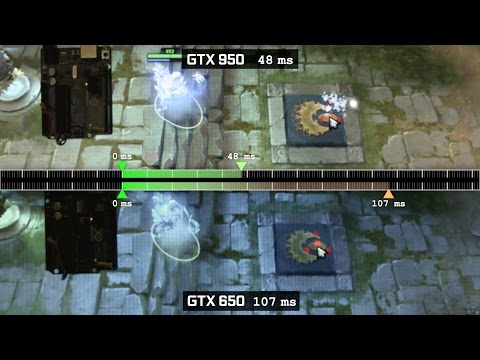
For MOBAs it's great to have a high framerate, as it is in any other game. More important though is responsiveness, which is dictated by performance and latency. With poor responsiveness, mouse clicks take longer to register, delaying your inputs and commands, which may make the difference between life and death.
By upgrading to a GeForce GTX 950, delays are reduced and responsiveness increased through a combination of improved performance and latency optimization, giving you the competitive edge. Below, our video demonstrates why responsiveness is so important in high-stakes MOBAs, and how delays are minimized on GeForce GTX 950 GPUs.
ในคลิปนี้ Nvidia เค้าว่าไว้ว่า
On the GeForce GTX 950, improved responsiveness is a product of Maxwell's faster frame times and framerates, and latency optimizations enabled by NVIDIA Control Panel tweaks that have been brought into GeForce Experience's one-click Optimal Playable Settings feature for the very first time.
Maxwell's faster frame times and framerates, แล้วเอาไปเทียบกับ ตัวเก่าตามที่เห็นในคลิปนั้นละครับ

และจากรูป ที่มาจากคลิป ของเว็บ Nvidia ก็คือ การไป ลงโปรแกรม GeForce Experience' แล้วเปิดใช้ one-click Optimal เพื่อปรับแต่ง config ก่อนที่จะเล่นเกม
ก็จะเห็นได้ว่า ไปปรับลด จาก 120 ไปวิ่งแค่ 100HZ เพื่อ ช่วยให้ ช่วยเรื่อง performance and latency ตามคลิปที่เห็นนั้นเอง
Through extensive testing we've determined which settings, in and out of game, optimize performance and responsiveness to give you the edge during gameplay.
In-game, graphical detail is reduced to improve frame rates and remove unnecessary detail that may obscure enemies, and out of game we adjust several options in the NVIDIA Control Panel:
NVIDIA Control Panel Vertical Sync (VSync): Games and game engines differ in their handling of VSync, in some cases reducing the quality of the experience. By enabling NVIDIA Control Panel VSync we ensure a consistent, high quality experience, free from screen tearing and stuttering. To avoid falling below the monitor's refresh rate, where VSync begins to degrade the experience, GeForce Experience's low latency MOBA Optimal Playable Settings will adjust graphics settings to optimal levels.
Refresh Rate: Out of the box, most high refresh-rate monitors run at 60Hz, instead of their rated 120-144Hz speeds. Many users fail to realize, and therefore have a sub-standard experience for the lifetime of the monitor. With the new GeForce Experience Low Latency Optimal Playable Settings, the refresh rate is set to the optimum speed.
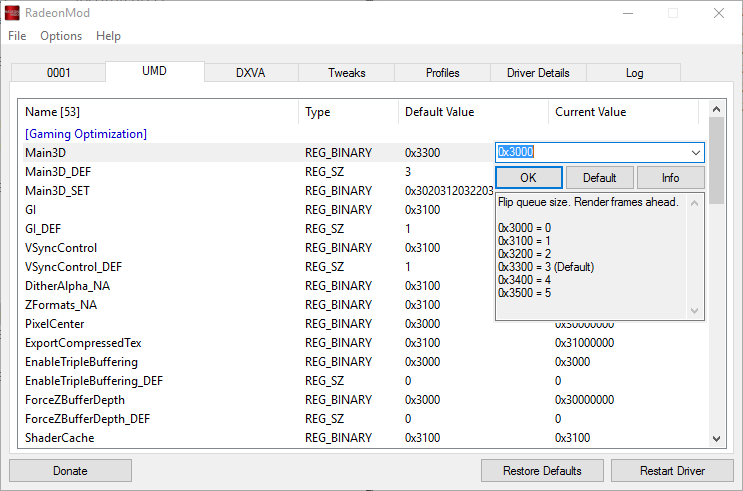
Maximum Pre-Rendered Frames: Limits the number of frames the CPU can prepare before the frames are processed by the GPU. By reducing the value input responsiveness is improved, reducing the delay between a mouse click and the action occurring on-screen.
Together, framerate and latency optimizations make a visible difference to the responsiveness of DOTA 2 and other MOBAs.

ก็เหมือนกับที่หลายๆคนบอก เวลาเล่นเกมพวกนี้ ถ้าเราไปเปิดใช้ Vertical Sync (VSync) On ไว้ ก็จะเกิดอาการ ที่เล่นว่า เม้า lag หน่วง เวลาเล่นเกม ที่หลายๆคนบอก
ทีนี้ ทั่วๆ ไป ก็เล่นเล่นเกมแบบ ปิด VSync แทน เพื่อ แก้ไข อาการ Mouse lag เวลาเล่นเกม
ทีนี้ Nvidia เค้าก็ไปแก้แทน ตามที่ Nvidia บอกตามนี้ครับ
NVIDIA Control Panel Vertical Sync (VSync): Games and game engines differ in their handling of VSync, in some cases reducing the quality of the experience. By enabling NVIDIA Control Panel VSync we ensure a consistent, high quality experience, free from screen tearing and stuttering. To avoid falling below the monitor's refresh rate, where VSync begins to degrade the experience, GeForce Experience's low latency MOBA Optimal Playable Settings will adjust graphics settings to optimal levels.
Refresh Rate: Out of the box, most high refresh-rate monitors run at 60Hz, instead of their rated 120-144Hz speeds. Many users fail to realize, and therefore have a sub-standard experience for the lifetime of the monitor. With the new GeForce Experience Low Latency Optimal Playable Settings, the refresh rate is set to the optimum speed.
Maximum Pre-Rendered Frames: Limits the number of frames the CPU can prepare before the frames are processed by the GPU. By reducing the value input responsiveness is improved, reducing the delay between a mouse click and the action occurring on-screen.
Together, framerate and latency optimizations make a visible difference to the responsiveness of DOTA 2 and other MOBAs
ซึ้ง ใช้กับเกม MOBAs เท่านั้นตามที่เห็นในรูป รายชื่อเกม ด้านซ้าย นั้นเองครับ
ซึ่งโดยผู้เล่นเกมนี้แนวๆ จริงๆ ทั่วๆไปแล้ว ปิด Vertical Sync เล่นกันหมดเกือบหมดละ ดังนั้น เลยไม่มีปัญหา เม้า lag latency ครับ มันก็เลยไม่มีใครสนใจ
และที่สำคัญ แทบจะทุกคน หรือแม่กระทั้ง เทพๆ Nvidia แถวๆ นี้ เวลาลงไดวเวอร์ Nvidia แทบทุกคน แนะนำว่า อย่าไปลง โปรแกรม GeForce Experience ครับ 555+
มะเชื่อลองหาดูโพสเก่าๆ ดูได้ นะ แต่บางคนก็ลงGeForce Experience ไว้ตามปรกติ เวลาลงไดวเวอร์ Nvidia
.Last edited by THEFOOL; 25 Nov 2015, 12:39:01.Comment
-
ไปอานของพี่หรั่งมาสงสัยไม่มีให้ปรับจริงๆครับ บางอย่างก็หายไปจาก Catalyst เดิม รอดูเวอร์ชั่นต่อไป
Comment
-
หายเยอะครับ ปรับละเอียดไม่ได้ หมวดอื่นๆ นี่ เหมือนตัวรุ่นเก่า แต่สายเล่นเกม คงดูแค่ fps เวลาเล่นOriginally posted by daimon View Post
Comment
-
สาระมีอยู่จริงComment
-
ลงทับครับ โดยลงแค่ driver จะยังมีครบ แต่ใช้ CCC เดิมนะ ไม่ใช่ CrimsonOriginally posted by daimon View PostComment
-
ของผมไม่มีเมนู รูปแบบพิกเซล ที่ว่าอ่ะComment
-
ถ้าใช้สาย dp มันไม่มีให้อยู่แล้วครับOriginally posted by ducati995 View Post
ยกเว้นใช้สาย hdmi ถึงจะมีComment
-
-
-
แสดงว่าบางคนก็มีบางคนก็ไม่มี สงสัยกลับไปลงตัวเก่าละมั้งครับOriginally posted by good11 View PostComment




Comment