Announcement

Collapse
No announcement yet.

Security Essential 2011 เอามันออกยังไง

Collapse
X
 
  • Filter
  • Time
  • Show
Clear All
new posts

  • Security Essential 2011 เอามันออกยังไง

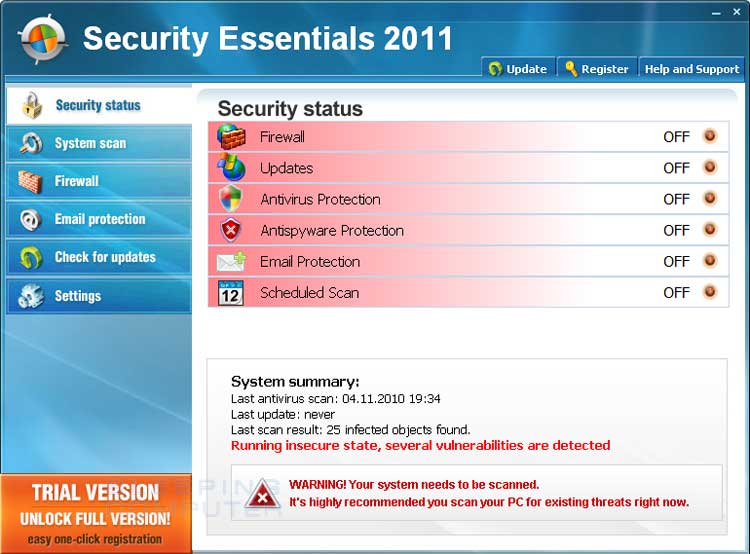
    ช่วยด้วยค่ะ มันมาโดยไม่รู้ตัวกำลังหาไฟล์ภาพเพื่อทำงาน อยู่ๆไอ้เจ้า Security Essential 2011มันก็โผล่มา เครื่องก็ไม่มีแอนตี้ไวรัสใดๆ....เครื่องที่ทำงานอ่ะ มะใช่เครื่องส่วนตัวด้วย

    จะเอามันออกยังไงคะ

    ช่วยด้วยค่ะ ไม่ค่อยรู้เรื่องคอมฯเท่าไหร่

  • #2
    มันของ microsoft นี่ครับ โปรแกรมนี่ มันเหมือนเป้น ป้องกันไวรัสโปรแกรมหนุึ่งนะครับ

    Microsoft Security Essentials

    Defend your data from cyberattacks using innovative cloud security solutions. Safeguard your infrastructure, apps, and data with Microsoft cybersecurity solutions.

    Comment


    • #3
      แต่อันนี้มันปลอมอ่ะ มันเป็นมัลแวร์โทรนจัน อะไรทำนองนั้น
      มันจะเด้งตัวเตื่อนบ้าบอตลอดเวลา ทำงานไม่ได้เรยค่ะ

      Comment


      • #4
        ตัวนี้ไม่ใช่ MSE ครับ มันเป็นของปลอม
        ลองดูวิธีแก้ที่นี่ครับ

        Remove Security Essentials 2011 (Uninstall Guide)
        Security Essentials 2011 is a rogue anti-spyware program from the same family as Internet Security 2010. This rogue is installed by malware that impersonates Flash updates or video codecs that are required to watch an online video. When you install these Trojans, instead of allowing you to watch the video they will instead download and install Security Essentials 2011 onto your computer without your permission or knowledge. Once Security Essentials 2011 is installed, it will be configured to start automatically when you log into Windows. Once started it will scan your computer, and when done, state that there are numerous infections on your computer, but will not allow you to remove any of them until you purchase the program. As the infections it shows are all fake, and as this program is a scam, you should definitely not purchase it. Also note that many of the files it states are infections are legitimate Windows files that if deleted could cause your computer to not operate correctly. Therefore, do not manually delete any of the files it states are infections.


        Comment


        • #5
          ลบโปรแกรม แล้วเอา spybot มาแสกนด่วนเลยคัรบ

          Comment


          • #6
            ขอบคุณทุกท่านค่ะ

            Comment


            • #7
              ตัววนี้ผมเคยเจอ หาทางแก้ยากมาก สุดท้ายลงโปรแกรม Malwarebyte จัดการ scan ออกได้เลย

              Comment

              Working...
              X