
 Tweet
Tweet
ถ้าจะใช้ itune เล่นเพลงแล้วทำให้เป็น bit perfect ยังไงครับสามารถทำได้มั้ย windows7 ครับ
-
-
จะให้ตอบว่าไง
จะเอาความหมายตามเวปใหน
มีอุปกรณ์ test พิสูจน์คำตอบ ตามตำราหรือไม่
อย่างน้อยๆต้องมีลำโพง creative ps 2000 ถูกสุดที่ใช้เช็คคำตอบได้ หรือไม่ก็ avr -
http://code.google.com/p/cmediadrivers/wiki/Bitperfect
What is "bitperfect", and what do I have to do for bitperfect playback?
An important measure for the quality of a soundcard's SPDIF port is the capability of so called "bitperfect playback" - this term coins the ability to directly transmit sound data through its SPDIF port to a receiver (e.g. a regular home theater amplifier, a custom built DAC, etc.) without having any loss or degradation in the process. An obvious way of testing this is to play some wave file while recording the output signal at the SPDIF port with another soundcard: after synchronization of the played and recorded sound files, a bit by bit comparison of both files should result in no differences if both soundcards are bitperfect.
There are easier ways to test this capability, they require however a receiver capable of decoding ac3 or dts. The basic assumption behind this test is that any kind of audio processing usually alters the ac3/dts frames in a way that corrupts them. The receiver fails to identify damaged ac3/dts frames and plays them like regular PCM audio which make them sound like white noise. By playing ac3 or dts audio embedded into a regular wave file (samples are available here), a playback chain (player software => kmixer/audio service => driver) can be tested for whether or not audio processing takes place: if the chain is bitperfect, the receiver decodes the DTS, and if the chain isn't, the receiver plays white noise.Comment
-
itune มันใช้ asio , waspi ได้ด้วยเหรอหรือรุ่นใหม่มันใช้ได้แล้วComment
-
บางที เดิมๆก็ bit perfect ได้ เช่น audigy 4 กด bit match playback ไว้
เปิด windows mediaplayer 10 เดิมๆ ไม่เปิด eq ไม่ปรับ volume ไม่เปิด loundness / srs windows volume ไม่มีผล เวลา ติ๊ก bit match
มันก็ test bit perfect ผ่าน
แต่ถ้าเป็นกาดที่มันไม่ผ่าน เช่น audigy2 zs/sb live ปรับอีท่าใหนมันก็ไม่ผ่าน asio มันก็ไม่ช่วยอะไรComment
-
official website apple เขาเขียนไว้เลย i-tune ปรับยังไงให้ bit perfect เล่น dts cd wav ออก avr ได้
- Turn OFF Sound Check
- Turn OFF Sound Enhancer
- Turn OFF EQ
- Turn iTunes volume up full
DTS decoding can only work if the digital DTS stream passes through iTunes completely unmodified. Otherwise, you will just hear static from your speakers. To make sure the sound is unmodified, follow the four steps below to make the appropriate settings.
Step 1: Drag the volume slider in iTunes to maximum.

Step 2: Set the volume adjustment of the audio file (in the Options section of the info for the file) to None.

To access this setting:
- Click once to select a song.
- Choose Get Info from the File menu.
- Click the Options tab if necessary.
Step 3: Turn off these preferences:
- Sound Enhancer
- Crossfade playback
- Sound Check
To access these preferences, choose Preferences from the iTunes menu (Edit menu in Windows) and click the Audio button. Then deselect each of the items listed above.

Step 4: Turn off the Equalizer.
- Click the Equalizer button.

- Make sure the Equalizer is off.

Comment
-
audigy4 รหัสไหน proหรือ valueOriginally posted by battlecruiser View Post
sb0380 หรือ sb0610Comment
-
ได้2ระหัสเลย รวมถึง audigy2value /2 platinum ex / 2zs platinum pro /2zs nb
แต่ 2 ธรรมดา 2 zs ธรรมดา ไมไ่ด้Comment
-
พอดีใช้ audigy 4 + avr ต่อแบบ coaxial อยู่ครับComment
-
ติ๊กอันนี้ digital out ปรับ 44.1
ลองเปิดไฟล์เหล่านี้ใน i-tune ตาม setting ข้างบน
ขอรายงานผลการทดลองด้วย
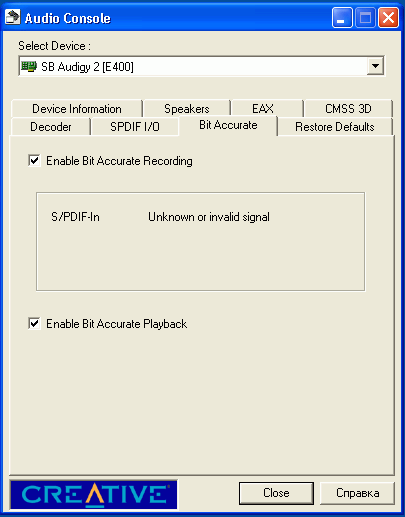
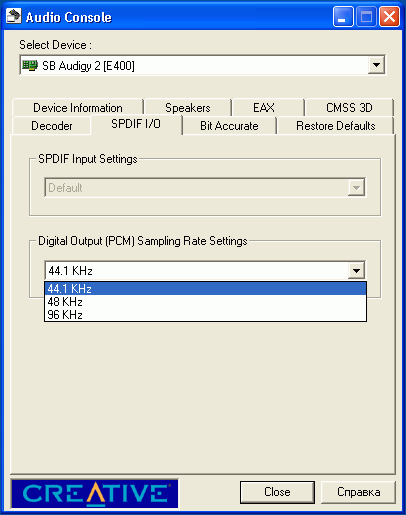
Comment
-
ทำตามทุกอย่างแต่ได้เสียงซ่าๆครับComment
-
ผมไม่เคย test i-tune ไว้
แต่ ตามนี้ รูปที่เคย set ไว้นาน แล้วเครื่องผมเอง ทำตามนี้ test bit perfect ผ่าน
หัวข้อหลักๆคือ ใช้ foobar ออก asio4all KS หรือ creative asio
ติ๊ก bit matched + ปรับ 44.1
volume ของ window ไม่มีผล
ปรับ volume ของ foobar ให้เต็ม
ไม่ใช้ dsp และ eq
Audigy 2 value

aureon

x-fi xmusic

Comment
-
ท่านเรือ เคยลองกับ auzentech forte ป่าวครับ?Comment
-
no
แต่คิดว่า x-fi ที่มี 3 mode น่าจะเหมือนกันหมดComment
-
โอเค ทำให้volumneที่วินโดว์ไม่มีผลได้แหล่ะ
รู้สึกมันจะปรับsampling อัตโนมัติด้วย (ใช้ไปเรื่อยๆ เปลี่ยนกลับมาดูอีกทีมันเปลี่ยนเอง)
แต่เช็คdts audio นี้คงข้าม ไม่มีอุปกรณ์Comment


Comment