Announcement

Collapse
No announcement yet.

[ LinX Premiere League 2011 ] แข่ง LinX 4.0Ghz ฤดูกาล 2554

Collapse
X
 
  • Filter
  • Time
  • Show
Clear All
new posts

  • OS: Windows 7 Ultimate 64bit
    CPU: AMD Phenom II X4 955 Black Edition C3 @ 4.3 GHz
    M/B: GIGABYTE GA-MA790GP-UD4H
    Ram: G.Skill F2-8800CL5-4GBPI (2GX2) DDR2
    VGA: HIS Radeon HD 4870 IceQ 4+ Turbo 1GB (256bit) GDDR5
    Power Supply: Tagan BZ Series BZ800 800W
    Case: Cooler Master Elite 335
    Cooling: CooLIT system - ECO A.L.C.


    Last edited by icxnews555; 19 Apr 2011, 02:11:25. Reason: แก้ Link รูปอัพไว้สองที่กันรูปหาย

    Comment


    • Originally posted by sompolli View Post
      ขอรบกวนถามคุณ ps000000 หน่อยครับ
      คุณบอกว่า สำหรับ gigabyte p67a
      ต้องใช้ cpu-z 1.57 จึงจะแสดงค่าไฟ vcore ถูกต้อง
      ผมใช้ p67a-ud7 b3
      oc i5 2500k ไปที่ 4.5 ghz ใช้ไฟ 1.245
      ทดสอบ linx mem all 20 loop ผ่าน
      แต่ดูจาก cpu-z เห็นแสดงค่าไฟเพียง 1.056 น่ะครับ
      ทำไมถึงยังแสดงค่าไฟไม่ถูกต้องอยู่อีกน่ะครับ
      ขอบคุณครับ
      ตอบแทนครับตอนนี้ บอร์ด Gig P67a รุ่น B3 จะกลับไปมีปัญหาเรื่องแสดงค่าไฟกับ cpu-z 1.57 เหมือนเดิมครับ ต้องรอ 1.58 ต่อไป

      Comment


      • รอบที่ 3 ครับ

        Win 7 64bit
        Cpu: Core i7 870
        Motherboard: ASUS Maximus III Gene
        Ram: G.SKILL DDR3 4GB. BUS 1600 RM
        Cooler: Cooler Master V6 GT

        Comment


        • up แข่งกันต่อไป ^ ^

          Comment


          • up

            Comment


            • Originally posted by dragon_horse View Post
              ซีพียูตัวนี้
              เย็นมากเลย
              ขนาด 5 กิ๊ก
              อุณหภูมิยังไม่ถึง 80 c
              ไม่ทราบว่า วีคอะไรครับ
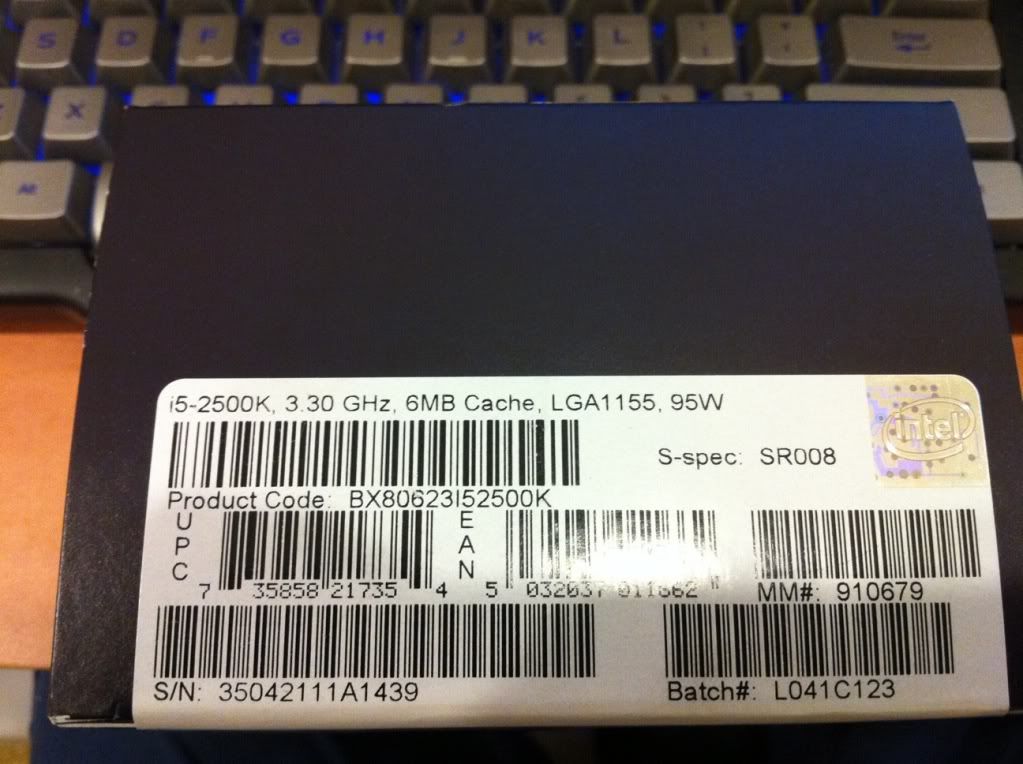
              ดูตรงไหนหรอ ว่าง วีค อะไร มีแต่คนถามผมก็บอกไม่ถูก ดุที่กล่องใช่ไหม

              Comment


              • ขอถามหน่อยครับ error จอฟ้า 0x00000101 นี้มันคืออะไรครับ

                Comment


                • 0x101 = increase vcore
                  0x124 = increase/decrease QPI/VTT first, if not increase/decrease vcore...have to test to see which one it is
                  on i7 45nm, usually means too little VVT/QPI for the speed of Uncore
                  on i7 32nm SB, usually means too little vCore
                  0x0A = unstable RAM/IMC, increase QPI first, if that doesn't work increase vcore
                  0x1A = Memory management error. It usually means a bad stick of Ram. Test with Memtest or whatever you prefer. Try raising your Ram voltage
                  0x1E = increase vcore
                  0x3B = increase vcore
                  0x3D = increase vcore
                  0xD1 = QPI/VTT, increase/decrease as necessary, can also be unstable Ram, raise Ram voltage
                  0x9C = QPI/VTT most likely, but increasing vcore has helped in some instances
                  0x50 = RAM timings/Frequency or uncore multi unstable, increase RAM voltage or adjust QPI/VTT, or lower uncore if you're higher than 2x
                  0x109 = Not enough or too Much memory voltage
                  0x116 = Low IOH (NB) voltage, GPU issue (most common when running multi-GPU/overclocking GPU)
                  0x7E = Corrupted OS file, possibly from overclocking. Run sfc /scannow and chkdsk /r

                  Comment


                  • Originally posted by TWK. View Post
                    0x101 = increase vcore
                    0x124 = increase/decrease QPI/VTT first, if not increase/decrease vcore...have to test to see which one it is
                    on i7 45nm, usually means too little VVT/QPI for the speed of Uncore
                    on i7 32nm SB, usually means too little vCore
                    0x0A = unstable RAM/IMC, increase QPI first, if that doesn't work increase vcore
                    0x1A = Memory management error. It usually means a bad stick of Ram. Test with Memtest or whatever you prefer. Try raising your Ram voltage
                    0x1E = increase vcore
                    0x3B = increase vcore
                    0x3D = increase vcore
                    0xD1 = QPI/VTT, increase/decrease as necessary, can also be unstable Ram, raise Ram voltage
                    0x9C = QPI/VTT most likely, but increasing vcore has helped in some instances
                    0x50 = RAM timings/Frequency or uncore multi unstable, increase RAM voltage or adjust QPI/VTT, or lower uncore if you're higher than 2x
                    0x109 = Not enough or too Much memory voltage
                    0x116 = Low IOH (NB) voltage, GPU issue (most common when running multi-GPU/overclocking GPU)
                    0x7E = Corrupted OS file, possibly from overclocking. Run sfc /scannow and chkdsk /r
                    จดเลยครับขอบคุณเทพ TWK ครับ

                    Comment


                    • สัปดาห์นี้เริ่มร้อนแล้วนะครับ ตัดอัพตรงนี้ละกัน

                      Originally posted by sompolli View Post
                      ขอรบกวนถามคุณ ps000000 หน่อยครับ
                      คุณบอกว่า สำหรับ gigabyte p67a
                      ต้องใช้ cpu-z 1.57 จึงจะแสดงค่าไฟ vcore ถูกต้อง
                      ผมใช้ p67a-ud7 b3
                      oc i5 2500k ไปที่ 4.5 ghz ใช้ไฟ 1.245
                      ทดสอบ linx mem all 20 loop ผ่าน
                      แต่ดูจาก cpu-z เห็นแสดงค่าไฟเพียง 1.056 น่ะครับ
                      ทำไมถึงยังแสดงค่าไฟไม่ถูกต้องอยู่อีกน่ะครับ
                      ขอบคุณครับ
                      B3 ทำพิษอีกครับ

                      ทำไม gigabyte ชอบทำอะไรให้ CPUZ งงอยู่เรื่อยเลย อิๆ

                      Comment


                      • Originally posted by dragon_horse View Post
                        เอ...
                        ก็ท่านทำได้ถึง 5.3 5.4 ไปแล้วนี่ กับ i7 2600k
                        มิใช่หรือครับ
                        5.3-5.4 ทดสอบโปรแกรมทั่วไปได้ครับแต่ Prime95/LinX/หรืออะไรโหดๆยังไม่ผ่านครับ

                        Comment


                        • Originally posted by numthowhoo View Post
                          ดูตรงไหนหรอ ว่าง วีค อะไร มีแต่คนถามผมก็บอกไม่ถูก ดุที่กล่องใช่ไหม
                          กล่องครับ ตรงฉลากบาร์โค้ดสีขาวๆ


                          ตรงคำว่า Batch "L041C123" คือเลข FPO/BATCH หรือคนไทยเรียกว่า WEEK

                          Comment


                          • Originally posted by icxnews555 View Post
                            ขออัพอีกรูปนึงนะครับ เห็น ohozaa.com โหลดช้าเหลือเกิน

                            OS: Windows 7 Ultimate 64bit
                            CPU: AMD Phenom II X4 955 Black Edition C3 @ 4.3 GHz
                            M/B: GIGABYTE GA-MA790GP-UD4H
                            Ram: G.Skill F2-8800CL5-4GBPI (2GX2) DDR2
                            VGA: HIS Radeon HD 4870 IceQ 4+ Turbo 1GB (256bit) GDDR5
                            Power Supply: Tagan BZ Series BZ800 800W
                            Case: Cooler Master Elite 335
                            Cooling: CooLIT system - ECO A.L.C.
                            [/url]
                            X4-955BE ตัวนี้ขั้นเทพเลยนะครับ ดูจาก VCore และ Topspeed

                            Comment


                            • Originally posted by r.au_x-zyt View Post
                              รอบที่ 3 ครับ

                              Win 7 64bit
                              Cpu: Core i7 870
                              Motherboard: ASUS Maximus III Gene
                              Ram: G.SKILL DDR3 4GB. BUS 1600 RM
                              Cooler: Cooler Master V6 GT
                              เกินร้อยองศาเลยครับ นับถือๆ!!!

                              Comment


                              • Originally posted by TWK. View Post
                                0x101 = increase vcore
                                0x124 = increase/decrease QPI/VTT first, if not increase/decrease vcore...have to test to see which one it is
                                on i7 45nm, usually means too little VVT/QPI for the speed of Uncore
                                on i7 32nm SB, usually means too little vCore
                                0x0A = unstable RAM/IMC, increase QPI first, if that doesn't work increase vcore
                                0x1A = Memory management error. It usually means a bad stick of Ram. Test with Memtest or whatever you prefer. Try raising your Ram voltage
                                0x1E = increase vcore
                                0x3B = increase vcore
                                0x3D = increase vcore
                                0xD1 = QPI/VTT, increase/decrease as necessary, can also be unstable Ram, raise Ram voltage
                                0x9C = QPI/VTT most likely, but increasing vcore has helped in some instances
                                0x50 = RAM timings/Frequency or uncore multi unstable, increase RAM voltage or adjust QPI/VTT, or lower uncore if you're higher than 2x
                                0x109 = Not enough or too Much memory voltage
                                0x116 = Low IOH (NB) voltage, GPU issue (most common when running multi-GPU/overclocking GPU)
                                0x7E = Corrupted OS file, possibly from overclocking. Run sfc /scannow and chkdsk /r
                                ลุงแปลหน่อยสิ ภาษาอังกฤษ ไม่แข็งแรง อิอิ กำ

                                Comment

                                Working...
                                X