Announcement

Collapse
No announcement yet.

ค่า DC Mode ใน CPU-Z

Collapse
X
 
  • Filter
  • Time
  • Show
Clear All
new posts

  • ค่า DC Mode ใน CPU-Z


    รบกวนผู้รู้หน่อยครับ
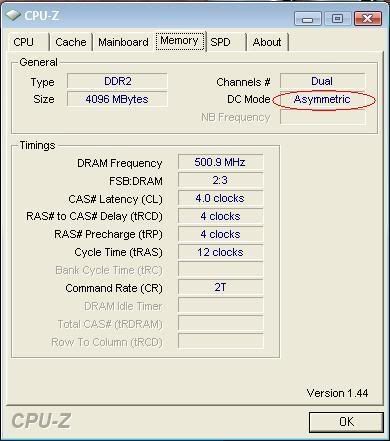
    ค่า DC Mode ใน CPU-Z
    พอใส่ Ram 4 GB แล้วมันกลายเป็น Asymmetric
    ปกติต้องเป็น Symmetric หมายความว่าไงครับ
    ไม่ทราบว่าต้องแก้ยังไงครับ
    ขอบคุณครับ

  • #2
    Dc mode นี่มันช้วยอะไรหรอครับ

    Comment


    • #3
      DC mode คือไฟกระแสตรงคับ symmetric คือ สมมาตร คับ

      Comment


      • #4
        DC Mode หมายถึง Dual Channel mode ครับ

        ถ้าขึ้นเป็น Asymmetric อาจจะเป็นเพราะใช้แรมขนาดไม่เท่ากัน หรือแรม 2 ตัวใช้ชิพไม่เหมือนกัน หรือใช้แรม 3 แถว ฯลฯ


        แต่ว่า ก่อนอื่น อัพเดท CPU-Z ด่วนเลยครับ ตอนนี้ไปถึง v.1.67.1 แล้ว

        CPU-Z for Windows® x86/x64 is a freeware that gathers information on some of the main devices of your system : Processor name and number, codename, process, package, cache levels. Mainboard and chipset. Memory type, size, timings, and module specifications (SPD). Real time measurement of each core's internal frequency, memory frequency. CPU-Z is fully supported on Windows® 11. The CPU-Z‘s detection engine is now available for customized use through the CPUID System Information Development Kit, a professional SDK built for the Microsoft Windows & Android.

        Comment


        • #5
          อ้าวผมเข้าใจผิดหรอเนี่ย เงิบ ฮ่าๆ

          Comment

          Working...
          X