Announcement

Collapse
No announcement yet.

สอบถาม Set Intel นี้กับ PSU ตัวนี้

Collapse
X
 
  • Filter
  • Time
  • Show
Clear All
new posts

  • สอบถาม Set Intel นี้กับ PSU ตัวนี้

    พอดีกำลังเก็บตังลุย ชุดนี้ครับ
    CPU : i5 4590 3.3GHZ 6,690
    Gigabyte H97-D3H 3,320
    RAM : Kington HYPER-X DDR3 1600 4GBx2 2,750
    VGA : MSI GTX970 GAMING 4GB 14,800
    SINK CM TX3 EVO 680

    -----

    PSU ที่ใช้เป็น Corsair VS 650W ครับ
    ที่เหลือใช้ของเดิมครับ
    ** ผมไม่แน่ใจว่า PSU จะเอาอยู่รึเปล่าครับ ขอบคุณครับ**

  • #2
    Originally posted by arctictong View Post
    พอดีกำลังเก็บตังลุย ชุดนี้ครับ
    CPU : i5 4590 3.3GHZ 6,690
    Gigabyte H97-D3H 3,320
    RAM : Kington HYPER-X DDR3 1600 4GBx2 2,750
    VGA : MSI GTX970 GAMING 4GB 14,800
    SINK CM TX3 EVO 680

    -----

    PSU ที่ใช้เป็น Corsair VS 650W ครับ
    ที่เหลือใช้ของเดิมครับ
    ** ผมไม่แน่ใจว่า PSU จะเอาอยู่รึเปล่าครับ ขอบคุณครับ**
    Originally posted by THEFOOL View Post
    Battlefield 4 Loves High Speed Memory

    By Dustin Sklavos posted Oct 21st 2013


    I don?t know if it?s been obvious, but we?re pretty excited about the upcoming launch of Battlefield 4 around here. I?m not even necessarily a big fan of the franchise, isolating most of my online multiplayer to games like MechWarrior Online, but I love technology and I love seeing new games really push the limits of modern hardware. The tail end of 2012 saw games start to push hardware again; BioShock Infinite may be Unreal Engine 3, but it?s still capable of being punishing. Meanwhile, Far Cry 3 and Tomb Raider both made major advances in both graphic fidelity and required hardware commensurate to their visuals, and even the underwhelming Crysis 3 had some very impressive technology under the hood.
    Yet all of that almost pales in comparison to how far EA and DICE have been willing to push the envelope with the Frostbite Engine 3-powered Battlefield 4. Here?s a game that flat out requires a 64-bit operating system and will use a not inconsiderable amount of system memory; EA actually recommends you have a minimum of 8GB of RAM! 8GB has been the ?sweet spot? for Windows just for basic users for a while now, with 16GB really the most ideal for enthusiasts, but now 8GB is turning into just a baseline.
    Interestingly, Battlefield 4 takes a pretty holistic approach to the system it runs on. Isolating bottlenecks used to be pretty easy: you were either CPU limited or GPU limited. Either your graphics hardware was holding you back or your processor was. As long as you weren?t running 4GB or less system memory, RAM wasn?t an issue. Yet with Battlefield 4, your RAM is important again in more ways than you might have expected.
    I?ve been doing testing on Haswell to determine whether or not higher speed memory could improve system and specifically gaming performance, especially with multi-GPU systems. My intuition and some of the research I?ve read online suggests that Haswell?s ?sweet spot? memory speed has actually jumped from the time-honored 1600MHz to 1866MHz. What I found with Battlefield 4 is remarkable, though. Testing on an i7-4770K overclocked to 4.4GHz and two overclocked GeForce GTX 780s in SLI, I discovered that memory speed affects Battlefield 4 performance in a very measurable and perceptible way. Check this out:

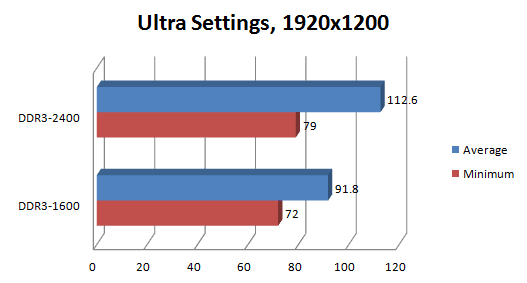
    Running at 1920x1200, or slightly above the most common resolution of 1920x1080, bumping our 32GB of Dominator Platinum from DDR3-1600 to its XMP speed of DDR3-2400 raised the average framerate a staggering 22.7% and the minimum framerate a still impressive 9.7%. Keeping in mind these framerates are both still well above the magical 60fps, nonetheless it stands to reason a user with less GPU horsepower might get a healthy amount of mileage out of faster memory.

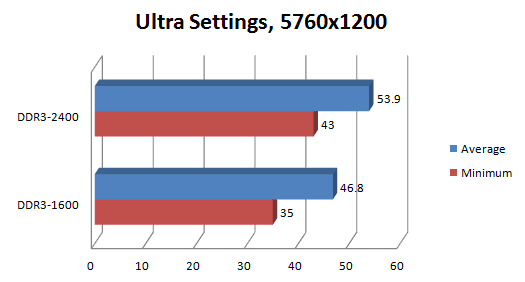
    Where things get really exciting is in surround at a monstrous 5760x1200. Ordinarily this is a situation where the system will become totally GPU bound, yet Battlefield 4 again demonstrates a performance uptick going from DDR3-1600 to DDR3-2400. Average framerates are up 15.2%, and the all-important minimum framerate goes up 22.9%! Recognizing that these are rough figures culled from FRAPS runs in fairly empty maps, it?s still a large enough difference to be outside of the margin of error and more importantly, it?s a perceptible one. Playing the open beta in surround, I found that the faster 2400MHz on the memory made the game noticeably smoother and eliminated a substantial amount of stutter.
    The takeaway is that Frostbite Engine 3 is capable of pushing the memory subsystem in ways we hadn?t anticipated. Other games are due to be released on Frostbite Engine 3, too, and they?re not inconsiderable titles. We?re talking about Dragon Age: Inquisition, Mirror?s Edge 2, Need for Speed: Rivals, and the next Mass Effect. If you?re still running DDR3-1600 and Battlefield 4 or one of these other games is on your radar, now may be the time to upgrade to some faster Vengeance, Vengeance Pro, or Dominator Platinum memory. I don?t think 1600MHz is going to cut it anymore, and frankly, I?m kind of excited to see where the technology goes from here.


    .


    Originally posted by prapharn View Post
    2011V3 มันคงไม่ได้ช่วยอะไรมาก แบนวิทเหลือใช้ 2011ตัวแรก แรม 1600 กับ 2400 นี่พอรู้สึกได้นะครับ
    Originally posted by MooNoiOCZ View Post
    1600MHz VS 1866MHz บอกได้เลยแทบไม่รู้สึก
    1600MHz VS 2400MHz โอ้โหว!!! รู้สึกได้เลย ไม่ได้โม้ เพราะเจอกับตัวเองมาแล้ว
    1600MHz VS 2800MHz โอ้แม่เจ้า!!! ปั่นfps แรงขึ้นไปแบบ ลองมาแล้ว ยืนยันนั่งยันนอนยันว่าลืม บัส1600MHz ไปเลยขอบอก
    ลองดู ^^
    Last edited by THEFOOL; 29 Nov 2014, 14:28:36.

    Comment


    • #3
      ผมว่าเครื่องท่านค่อนข้างจะโหดอยู่นะและคิดว่าน่าจะลงทุนกับหัวใจหลักอย่าง psu ดีๆสักตัวครับ แนะนำ Seasonic M12 II Bronze 750W EVO Full Modular 3390 บาท

      Comment


      • #4
        Originally posted by THEFOOL View Post


        ลองดู ^^
        ขอบคุณครับ พยายามความทำเข้าใจอยู่ครับ 5555+

        Comment


        • #5
          .
          Last edited by arctictong; 29 Nov 2014, 14:32:26.

          Comment


          • #6
            Originally posted by ozjom672 View Post
            ผมว่าเครื่องท่านค่อนข้างจะโหดอยู่นะและคิดว่าน่าจะลงทุนกับหัวใจหลักอย่าง psu ดีๆสักตัวครับ แนะนำ Seasonic M12 II Bronze 750W EVO Full Modular 3390 บาท
            ขอบคุณครับ ก็คิดอยุ่เหมือนกันครับ เก็บเงินไปเรื่อยๆสงสัยได้จัด ด้วย ฮาฮ่าาา มองแอบมองของ XFX ไว้ครับ

            Comment


            • #7
              แนะนำ บอร์ด z97 เลยครับ ตัวถูกๆ ก็ได้ ใช้ได้เหมือนกันครับ

              บัสแรมก็ เพิ่มอีก 500+ ก็ได้บัสสุงๆละ

              ถ้างบไม่พอ แนะนำว่า ใช้ GPU ออน intel แทนไปก่อนครับ

              แล้วหาเงินเพิ่มค่อยซื้อการ์ดจอมาใส่ที่หลังเล่นก็ยังได้ เผลอๆ ราคาตกถูกลงไปอีกนะ

              ส่วน HDD ซื้อ M.2 มาใช้ดีกว่าซื้อ SSD เห็นผลแตกต่างครับ หาอ่านได้ที่ห้อง HDD
              Last edited by THEFOOL; 29 Nov 2014, 14:57:11.

              Comment


              • #8
                สุดยอดเลยครับ คุณ THEFOOL
                ขอบคุณครับ

                Comment


                • #9
                  i5 4590 เล่นเกมวิ่งจริง 3.3 GHz เองนะ

                  แนะนำว่า ถ้าจัด i5 4690k ได้ +อีก 1500 ได้มั้ง
                  ดีกว่าครับ

                  จัดได้ก็ดีครับ ถึงแม้ว่าตอนนี้ไม่คิดจะ oc

                  แต่ในอนาคต เริ่มคันไม้ ชำนาญ ใช้ intel นี่ 2 3 4 ปี อาจได้ oc แน่ๆ ครับ ^^

                  โดยเฉพาะเล่นเกมนี่ วิ่ง 3.3 กับ กับ oC วิ่ง 4.5 นี่ แจ่มๆ เลย

                  อ่อละก็ ซิ้ง อย่างต่ำแนะนำ 212x ลม ครับ หรือมีงบพอก็ลงน้ำ ดีๆ เลย 2 พัดลมนะ

                  เพราะ i5 เจนใหม่นี่ ตัวร้อนเลย


                  55555555+ ยิ่งบอก งบยิ่งบานๆๆๆๆๆๆๆ
                  Last edited by THEFOOL; 29 Nov 2014, 14:55:53.

                  Comment


                  • #10
                    Originally posted by THEFOOL View Post
                    แนะนำ บอร์ด z97 เลยครับ ตัวถูกๆ ก็ได้ ใช้ได้เหมือนกันครับ บัสแรมก็ เพิ่มอีก 500+ ก็ได้บัสสุงๆละ

                    ถ้างบไม่พอ แนะนำว่า ใช้ GPU ออน intel แทนไปก่อนครับ

                    แล้วหาเงินเพิ่มค่อยซื้อการ์ดจอมาใส่ที่หลังเล่นก็ยังได้ เผลอๆ ราคาตกถูกลงไปอีกนะ

                    ส่วน HDD ซื้อ M.2 มาใช้ดีกว่าซื้อ SSD เห็นผลแตกต่างครับ หาอ่านได้ที่ห้อง HDD

                    Z97 ราคามันก็ไล่ๆกับทุกยี่ห้อเลยนี่ครับ
                    ส่วน ram คงเป็นตัวนี้สินะครับ G.SKILL DDR3 8GTX 2400(4GBx2)
                    ส่วนเงินนั้น รอครบดีเดียวครับ ทำใจลำบากซื้อมารอ วางอยู่ตรงหน้า 5555+
                    ส่วน SSD นี่คงต้องอ่านจริงๆ เพราะผมไม่รู้ประสิทธิภาพเรื่องความแตกต่างเลย ขอบคุณครับ

                    Comment


                    • #11
                      Originally posted by arctictong View Post
                      พอดีกำลังเก็บตังลุย ชุดนี้ครับ
                      CPU : i5 4590 3.3GHZ 6,690
                      Gigabyte H97-D3H 3,320
                      RAM : Kington HYPER-X DDR3 1600 4GBx2 2,750
                      VGA : MSI GTX970 GAMING 4GB 14,800
                      SINK CM TX3 EVO 680

                      -----

                      PSU ที่ใช้เป็น Corsair VS 650W ครับ
                      ที่เหลือใช้ของเดิมครับ
                      ** ผมไม่แน่ใจว่า PSU จะเอาอยู่รึเปล่าครับ ขอบคุณครับ**
                      เอาอยู่ สบายๆ นะ ( จริงๆ VS 550W ก็พอนะ)

                      Comment


                      • #12
                        Originally posted by THEFOOL View Post
                        i5 4590 เล่นเกมวิ่งจริง 3.3 GHz เองนะ

                        แนะนำว่า ถ้าจัด i5 4690k ได้ +อีก 1500 ได้มั้ง
                        ดีกว่าครับ

                        จัดได้ก็ดีครับ ถึงแม้ว่าตอนนี้ไม่คิดจะ oc

                        แต่ในอนาคต เริ่มคันไม้ ชำนาญ ใช้ intel นี่ 2 3 4 ปี อาจได้ oc แน่ๆ ครับ ^^

                        โดยเฉพาะเล่นเกมนี่ วิ่ง 3.3 กับ กับ oC วิ่ง 4.5 นี่ แจ่มๆ เลย

                        อ่อละก็ ซิ้ง อย่างต่ำแนะนำ 212x ลม ครับ หรือมีงบพอก็ลงน้ำ ดีๆ เลย 2 พัดลมนะ

                        เพราะ i5 เจนใหม่นี่ ตัวร้อนเลย


                        55555555+ ยิ่งบอก งบยิ่งบานๆๆๆๆๆๆๆ
                        55555555555 รุ้สึกจะไหลลลล นะครับ งบตั้งไว้ 3หมื่นคงไม่อยู่
                        เก็บมาสักพักได้แค่ ครั้งเดียวเอง T_T

                        Comment


                        • #13
                          Originally posted by TWK. View Post
                          เอาอยู่ สบายๆ นะ
                          เจอคำตอบนี้ไป เอาสะเบาใจเลยครับ อิๆ ขอบคุณครับ
                          ปล. เอาไปเล่น assassin's creed: unity far cry 4 เกมส์ใหม่ๆ ประมานนี้ครับ

                          Comment


                          • #14
                            CPU full load ไม่เกิน 100 Watt
                            VGA full load ไม่เกิน 200 Watt
                            สำหรับ i5 + GTX 970
                            ส่วนอุปกรณ์อื่น กินไฟชิ้นละ 5-10 Watt / ชิ้น
                            +-x/ แล้ว เครื่องดังกล่าว กินไฟให้ตายก็ไม่ถึง 500 Watt นะ

                            Comment


                            • #15
                              Originally posted by TWK. View Post
                              CPU full load ไม่เกิน 100 Watt
                              VGA full load ไม่เกิน 200 Watt
                              สำหรับ i5 + GTX 970
                              ส่วนอุปกรณ์อื่น กินไฟชิ้นละ 5-10 Watt / ชิ้น
                              +-x/ แล้ว เครื่องดังกล่าว กินไฟให้ตายก็ไม่ถึง 500 Watt นะ
                              ขอบคุณครับ เก็บตังโลดดดดดด

                              Comment

                              Working...
                              X