- Find this key:- " 0cc5b647-c1df-4637-891a-dec35c318583 "
- Within this key, there is a value called: " ValueMax "
- This value represents the % number of cores the system will park - the default 100% ie: all Cores are potentially park-able
- Change the value from 64 to 0 so the " ValueMin " and " ValueMax " are both zero
- You will have to find the key a few times and repeat the process for each time it is found - the number of instances will depend on the number of power profiles in your system [ in my DAW it was only found twice ]
- Do a full shutdown and power-off and cold-re-start
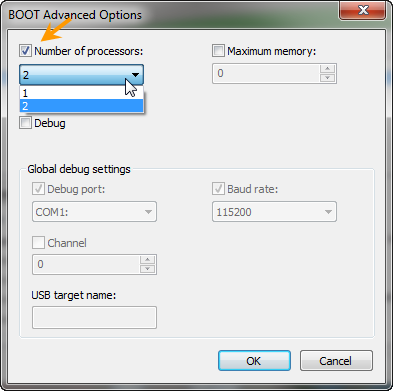
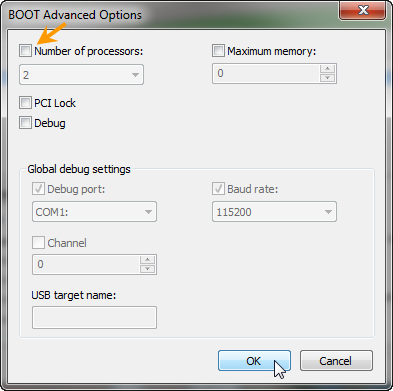
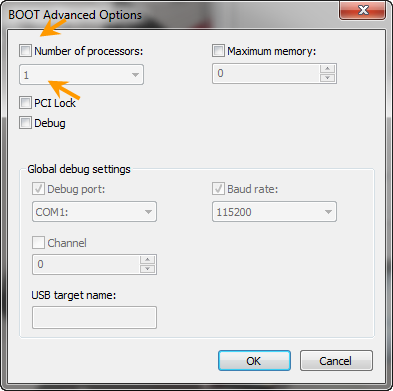
ในหน้าต่าง BOOT Advanced Options ให้ดูที่ Number of processors ว่ามีเครื่องหมายเช็กไว้หรือเปล่า ถ้ามีให้เอาออก (ตรงเมนู Drop down ถ้าคลิกดูมันจะเห็นแค่ 2 Core) เสร็จแล้วคลิกปุ่ม OK
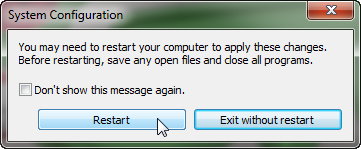
คลิกปุ่ม OK อีกครั้งในหน้าต่าง System Configuration มันจะมีหน้าต่างแจ้งเตือน ให้คลิกปุ่ม Restart เครื่องจะทำการรีสตาร์ทขึ้นมาใหม่
เมื่อเครื่องรีสตาร์ทเข้าสู่วินโดวส์เรียบร้อยแล้วลองตรวจเช็คดูอีกที ซึ่งถ้า Core ของ CPU ไม่มีปัญหาจริงๆ เราก็จะได้ Core ของ CPU กลับมาทำงานครบเช่นเดิม ตรงนี้ลองเข้ากลับเข้าไปดูที่หน้าต่าง BOOT Advanced Options ค่าปกติของมันจะต้องอยู่ในลักษณะนี้ คือจะไม่มีเครื่องหมายเช็กที่ Number of processors และที่เมนู Drop down ซึ่งคลิกเช็กไม่ได้จะแสดงด้วยเลข 1 เสมอ
ทีนี้ลองคลิกเช็กให้มีเครื่องหมายที่ Number of processors แล้วคลิกเมนู Drop down ดู จะเห็นว่ามันมองเห็น Core ของ CPU ครบ 4 ตัว ซึ่งตรงนี้ก็คือส่วนสำหรับปรับแต่งการทำงาน Core ของ CPU ครับ ว่าจะให้มันทำงานกี่ Core
เมื่อเครื่องรีสตาร์ทเข้าสู่วินโดวส์เรียบร้อยแล้วลองตรวจเช็คดูอีกที ซึ่งถ้า Core ของ CPU ไม่มีปัญหาจริงๆ เราก็จะได้ Core ของ CPU กลับมาทำงานครบเช่นเดิม ตรงนี้ลองเข้ากลับเข้าไปดูที่หน้าต่าง BOOT Advanced Options ค่าปกติของมันจะต้องอยู่ในลักษณะนี้ คือจะไม่มีเครื่องหมายเช็กที่ Number of processors และที่เมนู Drop down ซึ่งคลิกเช็กไม่ได้จะแสดงด้วยเลข 1 เสมอ
ทีนี้ลองคลิกเช็กให้มีเครื่องหมายที่ Number of processors แล้วคลิกเมนู Drop down ดู จะเห็นว่ามันมองเห็น Core ของ CPU ครบ 4 ตัว ซึ่งตรงนี้ก็คือส่วนสำหรับปรับแต่งการทำงาน Core ของ CPU ครับ ว่าจะให้มันทำงานกี่ Core

 Tweet
Tweet
 i7 3770 เห็นแค่ 1 Core แก้ยังไงครับ





Comment