

 Tweet
Tweet
Intel Software News & Update
-
Intel Network Adapter Driver For Windows 10 25.2 WHQL ออกใหม่สนับสนุน 10 Gbps Ethernet PHY
:: Download Link ::


-
New Intel Rapid Storage Technology RAID/NVME Driver 17.9.2.1013 WHQL
Support Next Generation 96/144 Layer Intel NAND Flash SSD Base
Legendary NAND FLASH Technology Leadership for all mankind
Now with FLOATGATE 4-bit/cell upto 96/144 Layers NAND QLC
Leading with Intel Next Generation FLOATGATE 5-bit/cell FLC for PCIE 4.0/5.0 and CXL Era
Now Intel SSD 665P The first budget QLC 96 Layer NAND shipping high volumn.
New SMI Controller for QLC/FLC NAND
First Intel QLC 96 Layer NAND FLASH MODULE
Performance gain on QLC 96 Layer over TLC 64 Layer
Comment
-
Last edited by Comlow; 11 Aug 2020, 13:29:59.
-
Comment
-
Intel Graphic Driver 27.20.100.8581 BETA Add support Vulkan cache control- This BETA driver adds support for the Vulkan*3 extension VK_EXT_pipeline_creation_cache_control - This Khronos* extension adds flags to Vk*PipelineCreateInfo and VkPipelineCacheCreateInfo structures with the goal of providing information about potentially expensive hazards within the client driver during pipeline creation to the application before carrying them out rather than after.
DOWNLOAD LINK
เดาว่าต้องโผล่มา ทำทานสะหน่อยล่วงหน้าเลยละกันครับแฟนๆ Intel สงสาร ปวส.ไฟฟ้าตกงาน

Comment
-
DOWNLOAD LINK
https://downloadcenter.intel.com/dow...?product=59485
DOWNLOAD LINK
https://downloadcenter.intel.com/dow...?product=59485
Last edited by Comlow; 6 Aug 2020, 14:58:25.Comment
-
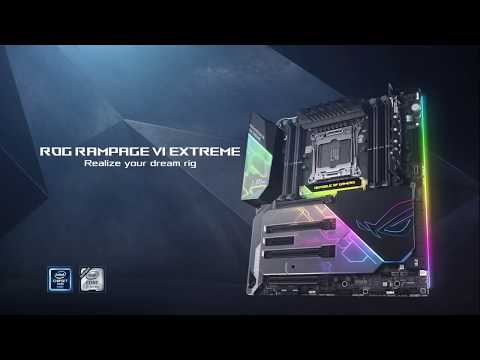
ASUS Update BIOS รุ่นใหม่ด้วย Microcode 02006906 DATE 2020-04-20
สำหรับ Skylake X (Core i9 78XX-79XX) /Skylake X Refresh (Core i9 99XX)
และ Microcode 05000029 สำหรับ Cascadelake X (Core i9 10XXXX) แล้ว
ASUS X299 BIOS รุ่นใหม่สำหรับแพลตฟอร์ม LGA 2066
ASUS X299 Utilized Lastest Intel microcode
New 02006906 Microcode Enable Enhance
AVX512 and AVX2 clock same speed

DOWNLOAD LINK
https://www.asus.com/support/download-center
Comment
-
Detailed Description
Note: Installing this Intel generic graphics driver will overwrite your computer manufacturer (OEM) customized driver. OEM drivers are handpicked and include customized features and solutions to platform-specific issues. The generic Intel driver provides users the latest and greatest feature enhancements and bug fixes that OEMs may not have customized yet to address platform-specific needs. Users can check for matching OEM versions at OEM websites.*2
_______________________
Highlights- Performance Optimizations for Wasteland 3* and Crusader Kings III* on 10th Generation Intel Core processors with Intel® Iris Plus graphics.
Wasteland 3*, Surgeon Simulator 2*, Windbound*, Crusader Kings III*, and Fall Guys: Ultimate Knockout* verified playable on Intel Iris Plus graphics or better.
*2 Are you still experiencing an error preventing the driver update? Look here for why and a solution.
Any graphics issues found using Intel generic graphics drivers should be reported directly to Intel. Corporate customers should always use OEM drivers and report all issues through the vendor they purchased the platforms and support through.
Developer highlights
OneAPI Level Zero Runtime*i pre-production release is now included. Please refer to the specification below.- OneAPI Specification: https://spec.oneapi.com/versions/lat...roduction.html
- OneAPI Level Zero Specification: https://spec.oneapi.com/versions/lat...eL0/index.html
Install the Intel® Driver & Support Assistant, which automatically checks for drivers on a regular basis and can provide notifications when new drivers are available.
This is a DCH driver. Click for more information about DCH drivers.
Supported OS versions- Microsoft Windows® 10-64 - Fall Creators Update (1709)(RS3)
- Microsoft Windows 10-64 - April 2018 Update (1803)(RS4)
- Microsoft Windows 10-64 - October 2018 Update (1809)(RS5)
- Microsoft Windows 10-64 – May 2019 Update (1903)(19H1)
- Microsoft Windows 10-64 – November 2019 Update (1909)(19H2)
- Microsoft Windows 10-64 – May 2020 Update (2004)(20H1)
Notes- Self-installing format (.exe) is the easiest installation method and our recommendation.
- Manual installation format (.zip) is intended for developers and IT professionals.
See the ReleaseNotes for installation instructions, supported hardware, and more.
Be sure to check out gameplay.intel.com, where you’ll find recommended game settings for many more of your favorite PC games.
About Intel® software and drivers
The driver or software for your Intel® component might have been changed or replaced by the computer manufacturer. We recommend you work with your computer manufacturer before installing our driver so you don’t lose features or customizations.
See a list of computer manufacturer support websites.
DOWNLOAD LINK
Comment
-
AOMedia Software Implementation Working Group to Bring AV1 to More Video Platforms
Alliance for Open Media (AOMedia) has announced the formation of the AOMedia Software Implementation Working Group (SIWG). SIWG will use the open-source scalable video technology for the AV1 (SVT-AV1) encoder that Intel has developed in collaboration with AOMedia member Netflix, to create production-ready AV1 encoder implementations. As mobile and livestreaming become more prevalent, these implementations will enable and deliver excellent video compression across a wide variety of video applications.
Optimized for video encoding on Intel® Xeon® Scalable processors, SVT-AV1 uniquely enables developers to scale performance levels when more processor cores or for higher resolutions. This encoding performance can help developers achieve specific quality and latency requirements for their video on demand (VOD) or livestreaming applications, and efficiently scale across their cloud infrastructure.
“AV1 encoders are part of the driving force for accelerating the deployment of live and on-demand streaming video experiences. We have developed SVT-AV1, in collaboration with Netflix, with the goal of creating an AV1 encoder that speeds innovation while driving adoption in the open-source community. With SVT-AV1 being adopted as part of AOMedia’s new encoder initiative, we look forward to collaborating with our fellow AOMedia members to bring further improvements to the internet, technology and video industries that are adopting AV1,” said Zach Hamm, AOMedia chairman and senior director of Visual Computing Strategy and Business Development at Intel.- For more information about the AOMedia SIWG, visit AOMedia Software Implementation Working Group to Bring AV1 to More Video Platforms.
- Register for the live online IBC 2020 AV1 panel on Sept. 8, “Discussion with Amazon, Facebook, Google, Intel, Netflix and Tencent on AV1 commercial readiness.”
- For more information on Scalable Video Technology, visit 01.org/svt.
More: Intel Customer Spotlight on Intel.com | Customer Stories on Intel Newsroom
Tags: AOM, Customer Stories, Open Visual Cloud, streaming, SVT-AV1, VOD
Comment
-
Intel Graphic Driver 27.20.100.8673 BETA
Detailed Description
Note: Installing this Intel generic graphics driver will overwrite your computer manufacturer (OEM) customized driver. OEM drivers are handpicked and include customized features and solutions to platform-specific issues. The generic Intel driver provides users the latest and greatest feature enhancements and bug fixes that OEMs may not have customized yet to address platform-specific needs. Users can check for matching OEM versions at OEM websites.*2
_______________________
Highlights- This BETA driver provides the latest OneAPI Beta Update to developers.
*2 Are you still experiencing an error preventing the driver update? Look here for why and a solution.
Any graphics issues found using Intel generic graphics drivers should be reported directly to Intel. Corporate customers should always use OEM drivers and report all issues through the vendor they purchased the platforms and support through.
Developer highlights
OneAPI Level Zero Runtime*i pre-production release is now included. Please refer to the specification below.- OneAPI Specification: https://spec.oneapi.com/versions/lat...roduction.html
- OneAPI Level Zero Specification: https://spec.oneapi.com/versions/lat...eL0/index.html
Install the Intel® Driver & Support Assistant, which automatically checks for drivers on a regular basis and can provide notifications when new drivers are available.
This is a DCH driver. Click for more information about DCH drivers.
Supported OS versions- Microsoft Windows® 10-64 - Fall Creators Update (1709)(RS3)
- Microsoft Windows 10-64 - April 2018 Update (1803)(RS4)
- Microsoft Windows 10-64 - October 2018 Update (1809)(RS5)
- Microsoft Windows 10-64 – May 2019 Update (1903)(19H1)
- Microsoft Windows 10-64 – November 2019 Update (1909)(19H2)
- Microsoft Windows 10-64 – May 2020 Update (2004)(20H1)
Notes- Self-installing format (.exe) is the easiest installation method and our recommendation.
- Manual installation format (.zip) is intended for developers and IT professionals.
See the ReleaseNotes for installation instructions, supported hardware, and more.
Be sure to check out gameplay.intel.com, where you’ll find recommended game settings for many more of your favorite PC games.
About Intel® software and drivers
The driver or software for your Intel® component might have been changed or replaced by the computer manufacturer. We recommend you work with your computer manufacturer before installing our driver so you don’t lose features or customizations.
See a list of computer manufacturer support websites.
DOWNLOAD LINK
https://downloadmirror.intel.com/298...0_100.8673.exe
Comment
-
AIDA64 6.25.5468 BETA ออกใหม่
สนับสนุนชุดคำสั่ง AVX512 VP2INTESECT ใหม่ใน CPU Tigerlake UP3/UP4/H
และ Intel AMX TILE AMX-BF16 AMX INT-8 ใน Sapphire Rapid SP แล้ว
Comment
-

Intel Wi-Fi 6 New Driver 21.120.0.9 WHQL Download Link below
Comment
-
Intel Memory and Storage Tool 1.2.79 WHQL
เครื่องมือใหม่สำหรับผู้ใช้งาน SSD จาก Intel ทุกรุ่นทั้ง 3D NAND Flash และ Optane Memory
DOWNLOAD LINK
หมายเหตุ ซอฟต์แวร์ใหม่นี้จะมาแทนที่ Intel SSD Toolbox ที่หมดอายุลงครับ
Comment
-

Comment



Comment