-
-
แจ่มครับ ขอบคุณที่เอาข่าวมาบอกครับ
-
-
สงสัยขนพนักงานไปทำไดวเวอร์การ์ดจอตัวใหม่กันหมด รุ่นเก่าๆ นี่เงียบไปเลยComment
-
มีปัญหาจอดับอีก หรือเปล่า ใช้ 15.12 WHQL ไม่เจอปัญหาใดๆ
มีปัญหาตั้งแต่ 16.1 16.1.1 16.2 จะรอดมััยว่ะ
มี Rise tomb raider ก็เล่น ไม่ได้ 15.12 ไม่ลื่น ไดเวอร์ยังไม่ Support เท่าที่ควร
ลองพวก Beta ก็เจอปัญหา ไดเวอร์กาก สู้เขียวไม่ได้เลย หลังๆ ขอให้เจริญฮวบๆ

Comment
-
อัพ driver แล้ว อย่าลืมอัพตัว gpu-z ด้วยนะครับ
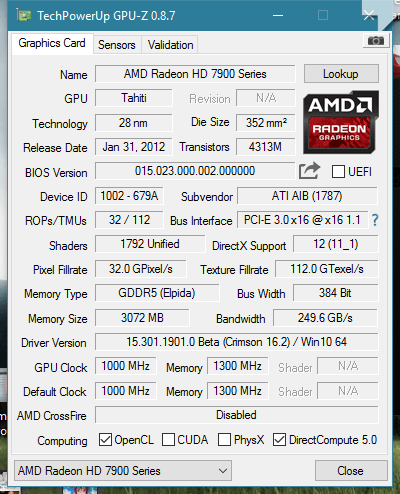
Comment
-
Crimson Edition 16.2
Resolved Issues
A black screen/TDR error may be encountered when booting a system with Intel + AMD graphics and an HDMI monitor connected
Choppy gameplay may be experienced when both AMD Freesync? and AMD Crossfire? are both enabled
Display corruption may be observed after keeping system idle for some time
Fallout 4 - Flickering may be experienced at various game locations with the v1.3 game update and with AMD Crossfire? enabled
Fallout 4 - Foliage/water may ripple/stutter when game is launched in High/Ultra settings mode
Fallout 4 - Screen tearing in systems with both AMD Freesync? and AMD Crossfire? enabled if game is left idle for a short period of time
Fallout 4 - Thumbnails may flicker or disappear while scrolling the Perk levels page
Far Cry 4 - Stuttering may be observed when launching the game with AMD Freesync? and AMD Crossfire? enabled
FRTC options are displayed on some unsupported laptop configurations with Intel CPU's and AMD GPU's
Radeon Settings may sometimes fails to launch with a "Context Creation Error" message
Rise of the Tomb Raider? - Corruption can be observed at some locations during gameplay
Rise of the Tomb Raider? - Flickering may be experienced at various game locations when the game is left idle in AMD Crossfire? mode under Windows 7
Rise of the Tomb Raider? - Game may intermittently crash or hang when launched with very high settings and AA is set to SMAA at 4K resolution
Rise of the Tomb Raider? - Lara Croft's hair may flicker in some locations if the Esc key is pressed
Rise of Tomb Raider? - A TDR error may be observed with some AMD Radeon 300 Series products after launching the "Geothermal Valley" mission
The AMD Overdrive? memory clock slider does not show original clock values if memory speeds are overclocked
World of Warcraft runs extremely slowly in quad crossfire at high resolutions
Known Issues
A few game titles may fail to launch or crash if the Gaming Evolved overlay is enabled. A temporary workaround is to disable the AMD Gaming Evolved "In Game Overlay"
Star Wars?: Battlefront - Corrupted ground textures may be observed in the Survival of Hoth mission
Cannot enable AMD Crossfire with some dual GPU AMD Radeon HD 59xx and HD 79xx series products
Fallout 4 - In game stutter may be experienced if the game is launched with AMD Crossfire enabled
XCOM 2 - Flickering textures may be experienced at various game locations
Rise of the Tomb Raider? - The game may randomly crash on launch if Tessellation is enabled
Core clocks may not maintain sustained clock speeds resulting in choppy performance and or screen corruptionComment
-
เข้ามาฟังด้วยครับComment
-
ตัวเดียวกันกับตัวนี้ไหมครับ

Comment
-
เดี่ยวค่อยลองใส่กับ NanoComment
-
สอบถามนิดครับมีใครใช้ฟังชั่นล๊อค FPS ได้มั้ยครับ ผมจะเอาไปใช้กับ dota2 ใช้ไม่ได้
T_TComment
-
เปิด vsync ทำได้อยู่แล้วนิครับ ผมใช้ประจำเปิดใน dota2Originally posted by KONGKIATTT View PostComment
-
vsync ล็อคไว้เท่าแค่ refresh rate ของจอครับOriginally posted by H2OPlUS View Post
แต่ฟังก์ชั่นนั้นของ AMD มันไปล็อค FPS ให้ เท่านั้น เท่านี้ ได้ครับ เช่น
บางคนเค้าจะต้องการจะปิด vsync และอยากได้ FPS มากกว่า 60 แต่ต้องการล็อคไว้แค่ 90
ไม่ให้เกินนี้ พอปั่น เฟรมเรท ถึง VGA มันก็จะลดการทำงานลงครับ เพราะถ้าไม่ล็อค+ ปิด vsync
การ์ดจอ จะทำงานเต็มที่ ตลอดเวลาเท่าที่มันจะปั่น FPS ของเกมนั้นๆ ได้ครับ
ปล.ส่วนตัวไม่ได้ลองกับ DOTA แต่ลองกับเกมอื่นComment
-

Comment

 Tweet
Tweet


 ...Thank U จ้า


Comment