Announcement

Collapse
No announcement yet.

รบกวนสอบถามเรื่อง SLI ครับ

Collapse
X
 
  • Filter
  • Time
  • Show
Clear All
new posts

  • รบกวนสอบถามเรื่อง SLI ครับ

    ตอนนี้ เสปกของผม

    i7 4790k
    mb asus maximus ranger
    ram g skill tridentx 8 GB
    vga 780ti oc gigabyte

    สอบถามว่า เสปกนี้ถ้า ยัด การ์ดจออีกตัวทำ sli ประสิทธิภาพต่างกับการใช้ บอรด socket 2011 มากไหมครับ

    socket 2011 ทำได้ดีกว่ามากไหมครับ ไม่รู้จริงๆครับ รบกวนผู้รู้ ช่วยชี้แจงแถลงไข

    ขอบคุณมากครับ

  • #2
    ไม่ต่างกันนะ (ถึงจะต่างก็คงไม่เกิน 0.5 %)

    Comment


    • #3
      Originally posted by Th1RTE3N View Post
      ตอนนี้ เสปกของผม

      i7 4790k
      mb asus maximus ranger
      ram g skill tridentx 8 GB
      vga 780ti oc gigabyte

      สอบถามว่า เสปกนี้ถ้า ยัด การ์ดจออีกตัวทำ sli ประสิทธิภาพต่างกับการใช้ บอรด socket 2011 มากไหมครับ

      socket 2011 ทำได้ดีกว่ามากไหมครับ ไม่รู้จริงๆครับ รบกวนผู้รู้ ช่วยชี้แจงแถลงไข

      ขอบคุณมากครับ
      ไม่นะ เท่าเดิม เพราะ pci-e 3.0 xเท่ากัน

      ถ้าอยากต่าง เล่น บัสแรม สูงๆ เห็นผล

      Comment


      • #4
        ประเด็นคือ ต้องการจะเล่นเกมส์ ให้ลื่นๆ ใช่ไหมครับ

        ถ้าเข้าใจตรงกันนะครับ เล่นเกมลื่น ก็คือ fps เฟรมในเกม สูงใช่ไหมครับ

        ถ้าเข้าใจตามนี้ จะเปลี่ยน แรม แล้วเล่นเกมให้ลื่นๆ จะบอกว่า ถ้าสเป็กคอม ใช้แรมวิ่ง bus 2400 + ได้ ก็ให้ซื้อมาใช้แทนครับ

        เล่นเกมส์ลื่น เพราะ fps เฟรมในเกมสุงขึ้น ลื่นแน่นอน นอนยันเลย


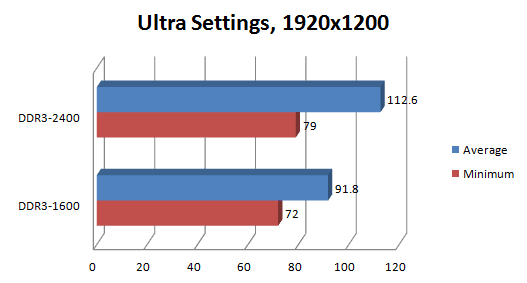
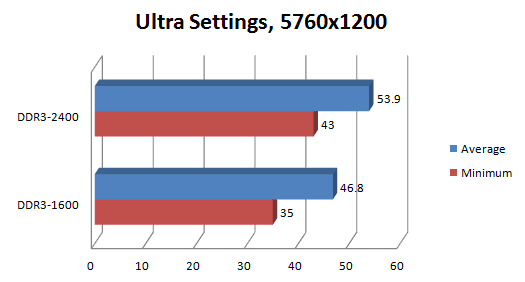
        ยิ่งใช้แรม bus สูงเท่าไหร่ เล่นเกมลื่นมากขุึ้น เพราะได้ เฟรม fps สูงขึ้นครับ เห็นผลตามรูปเลยครับ

        ยิ่งถ้าใช้ bus ram 2400 - 3000+ นี่ เฟรมมากกว่า 2133 แน่นอน

        Originally posted by THEFOOL View Post
        Battlefield 4 Loves High Speed Memory

        By Dustin Sklavos posted Oct 21st 2013


        I don?t know if it?s been obvious, but we?re pretty excited about the upcoming launch of Battlefield 4 around here. I?m not even necessarily a big fan of the franchise, isolating most of my online multiplayer to games like MechWarrior Online, but I love technology and I love seeing new games really push the limits of modern hardware. The tail end of 2012 saw games start to push hardware again; BioShock Infinite may be Unreal Engine 3, but it?s still capable of being punishing. Meanwhile, Far Cry 3 and Tomb Raider both made major advances in both graphic fidelity and required hardware commensurate to their visuals, and even the underwhelming Crysis 3 had some very impressive technology under the hood.
        Yet all of that almost pales in comparison to how far EA and DICE have been willing to push the envelope with the Frostbite Engine 3-powered Battlefield 4. Here?s a game that flat out requires a 64-bit operating system and will use a not inconsiderable amount of system memory; EA actually recommends you have a minimum of 8GB of RAM! 8GB has been the ?sweet spot? for Windows just for basic users for a while now, with 16GB really the most ideal for enthusiasts, but now 8GB is turning into just a baseline.
        Interestingly, Battlefield 4 takes a pretty holistic approach to the system it runs on. Isolating bottlenecks used to be pretty easy: you were either CPU limited or GPU limited. Either your graphics hardware was holding you back or your processor was. As long as you weren?t running 4GB or less system memory, RAM wasn?t an issue. Yet with Battlefield 4, your RAM is important again in more ways than you might have expected.
        I?ve been doing testing on Haswell to determine whether or not higher speed memory could improve system and specifically gaming performance, especially with multi-GPU systems. My intuition and some of the research I?ve read online suggests that Haswell?s ?sweet spot? memory speed has actually jumped from the time-honored 1600MHz to 1866MHz. What I found with Battlefield 4 is remarkable, though. Testing on an i7-4770K overclocked to 4.4GHz and two overclocked GeForce GTX 780s in SLI, I discovered that memory speed affects Battlefield 4 performance in a very measurable and perceptible way. Check this out:

        Running at 1920x1200, or slightly above the most common resolution of 1920x1080, bumping our 32GB of Dominator Platinum from DDR3-1600 to its XMP speed of DDR3-2400 raised the average framerate a staggering 22.7% and the minimum framerate a still impressive 9.7%. Keeping in mind these framerates are both still well above the magical 60fps, nonetheless it stands to reason a user with less GPU horsepower might get a healthy amount of mileage out of faster memory.

        Where things get really exciting is in surround at a monstrous 5760x1200. Ordinarily this is a situation where the system will become totally GPU bound, yet Battlefield 4 again demonstrates a performance uptick going from DDR3-1600 to DDR3-2400. Average framerates are up 15.2%, and the all-important minimum framerate goes up 22.9%! Recognizing that these are rough figures culled from FRAPS runs in fairly empty maps, it?s still a large enough difference to be outside of the margin of error and more importantly, it?s a perceptible one. Playing the open beta in surround, I found that the faster 2400MHz on the memory made the game noticeably smoother and eliminated a substantial amount of stutter.
        The takeaway is that Frostbite Engine 3 is capable of pushing the memory subsystem in ways we hadn?t anticipated. Other games are due to be released on Frostbite Engine 3, too, and they?re not inconsiderable titles. We?re talking about Dragon Age: Inquisition, Mirror?s Edge 2, Need for Speed: Rivals, and the next Mass Effect. If you?re still running DDR3-1600 and Battlefield 4 or one of these other games is on your radar, now may be the time to upgrade to some faster Vengeance, Vengeance Pro, or Dominator Platinum memory. I don?t think 1600MHz is going to cut it anymore, and frankly, I?m kind of excited to see where the technology goes from here.


        Originally posted by ihog6hog View Post
        มาอีกหนึ่งเกมส์ BF4 ยิ่งแรมบัสสูง ยิ่งทำให้เร็วขึ้นสำหรับ Full HD +


        เฟรม + เกือบ 20 fps แค่เปลี่ยนใช้แรมบัสสูงๆ ^^

        .

        Comment


        • #5
          Originally posted by THEFOOL View Post
          ไม่นะ เท่าเดิม เพราะ pci-e 3.0 xเท่ากัน

          ถ้าอยากต่าง เล่น บัสแรม สูงๆ เห็นผล
          คือไม่ต่างกันใช่ไหมครับ ท่าน ถึงต่างก็ไม่มาก ผมเข้าใจแบบนี้ ถูกต้องไหมครับ
          ขอบคุณครับ

          Comment


          • #6
            Originally posted by Th1RTE3N View Post
            คือไม่ต่างกันใช่ไหมครับ ท่าน ถึงต่างก็ไม่มาก ผมเข้าใจแบบนี้ ถูกต้องไหมครับ
            ขอบคุณครับ

            Comment


            • #7
              ตอนนี้ ram bus 2400 แล้วครับ

              Comment


              • #8


                2800 1T ^^

                Ram Avexir 2133 MPOWER 9-11-10-27


                ของเดิม 2133


                ิี


                Intel "Core" i7 4790k

                ^^
                Last edited by THEFOOL; 2 Jul 2014, 20:40:08.

                Comment


                • #9
                  5555+

                  Comment


                  • #10
                    Originally posted by akee_99 View Post
                    5555+
                    ขำไรวะ ฟุ้งซ่าน เฟ้ย พอมีเงิน มันร้อน 55555

                    Comment


                    • #11
                      จะsliจัดหนักละพี่ตู

                      Comment


                      • #12

                        Comment

                        Working...
                        X