
 Tweet
Tweet
 มาลุ้น NVidia GTX 670 Unlocking
มาลุ้นครับ ว่า GTX 670 จะปลด Shaders ได้ไหม ... จากข้อมูลเบื้องต้นนะครับ ตามที่เขาทดสอบกัน เขาระบุไว้ว่า การ์ด ที่นำมาทดสอบนั้นเป็น Galaxy GTX670 ตัวที่ใช้ PCB เดียวกันกับ GTX 680 ครับ รวมถึง bios ที่นำมาใช้ก็เป็นของ Galaxy GTX 680 เช่นกัน 

GPU-Z
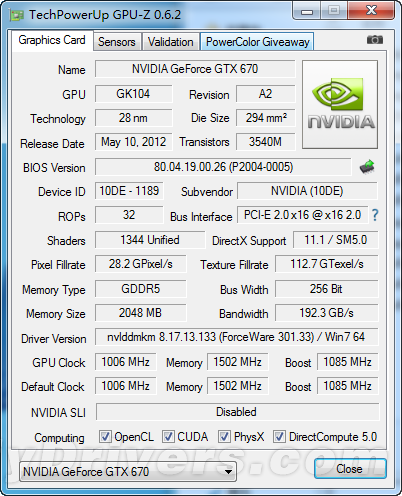
เริ่มต้นก่อนทำการ flash เขาสำรอง bios ตัวเก่าก่อนครับ ตามรูป
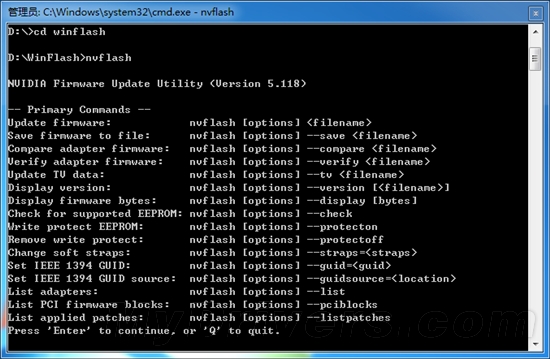
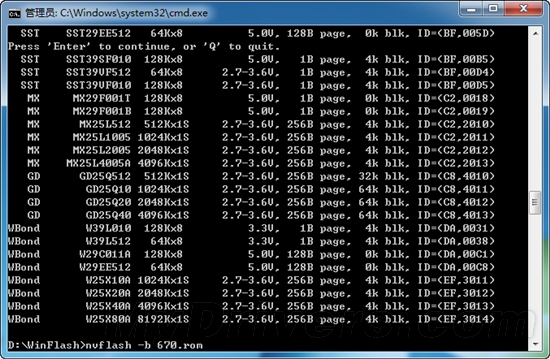
จากนั้นก็เริ่มทำการ flash bios เป็น GTX 680
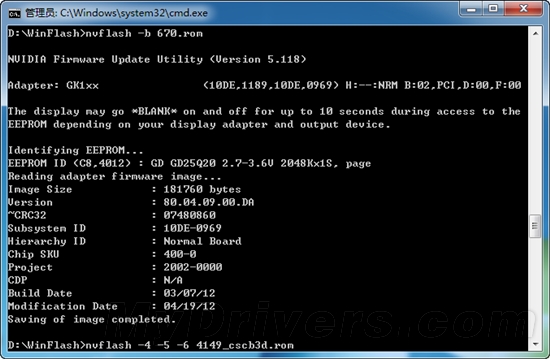
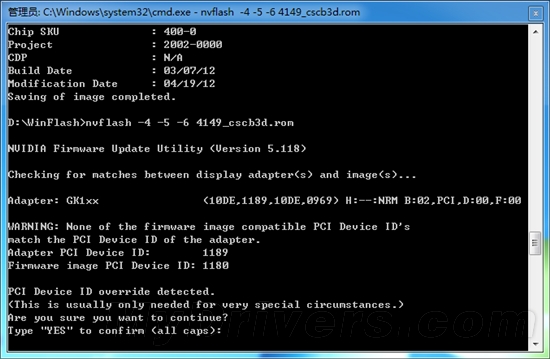
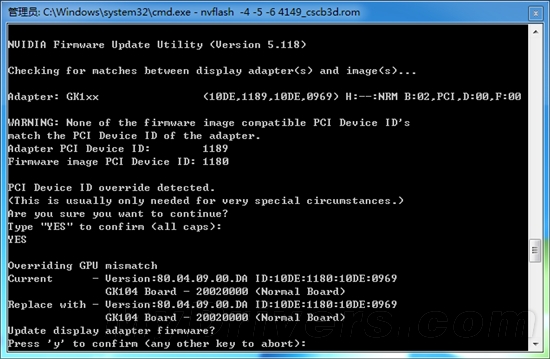
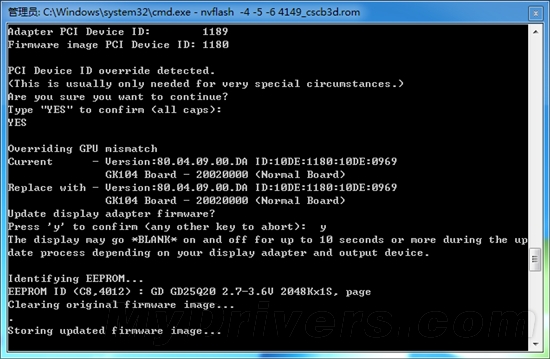
จากนั้นเขาก็ restart แล้วกลับเข้ามาดูผลงาน
ผลการทดลอง ออกมา ปรากฏ ว่า ปลดล็อค Shaders ไม่ผ่านครับ แต่ได้ Clock ที่สูง มาแทน คือ 1111/1176/6008MHz?
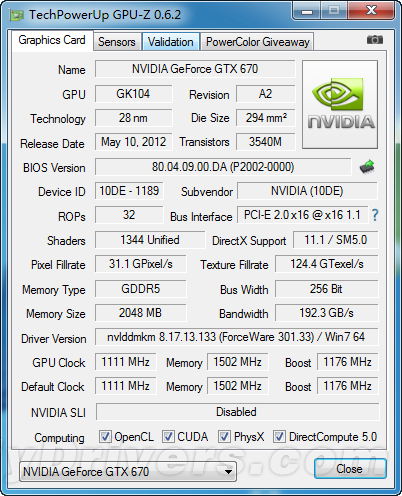
แต่เขาก็ไม่จบแค่นั้นนะครับ ยังมีผลการทดสอบ มาให้เทียบ กันถึงความแตกต่าง เทียบกับ GTX 680
ถ้าจะให้ผมเดา คงเป็นการทดสอบระหว่าง GTX670 ก่อนอัพเดท / หลังอัพเดท / GTX680
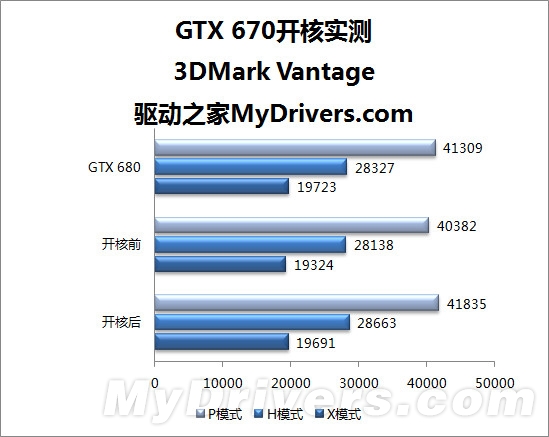
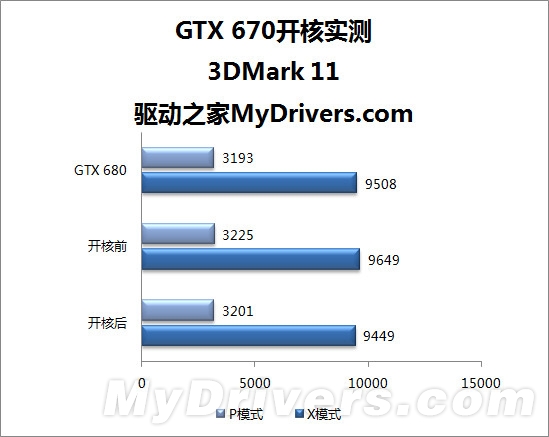
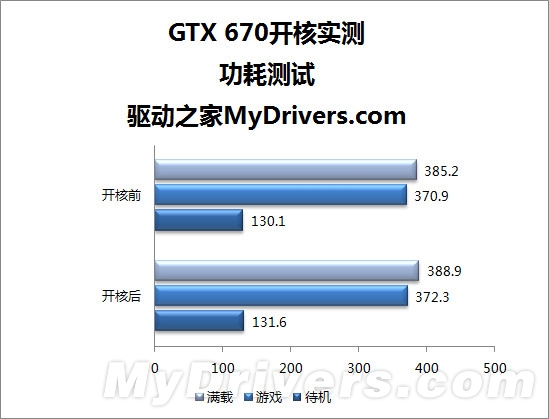
อัตราการใช้พลังงาน ( TDP )
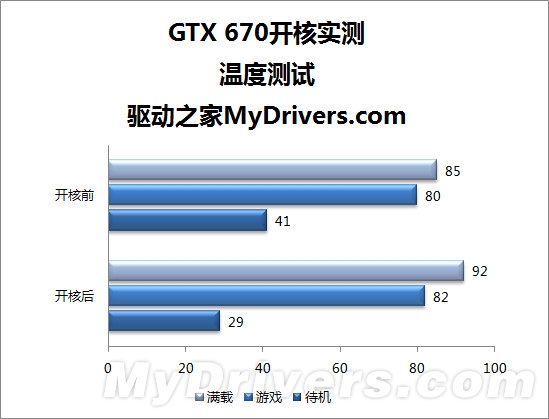
-----------------------------------------------------------------------------------
แถม ตัว nvflash ล่้าสุดครับ เล่นบน windows ได้เลย
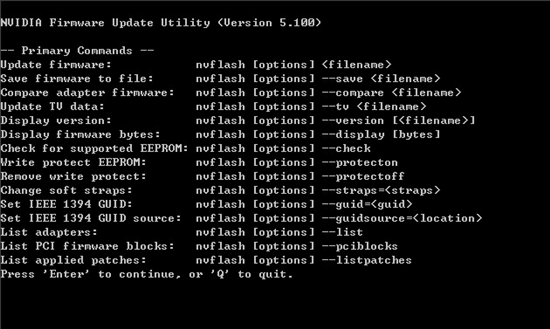
NVFlash specific command-line operation in the following format:
1, to upgrade the BIOS: nvflash - filename.
2 Save the BIOS file: nvflash - save filename.
3, compared to the graphics card BIOS version: nvflash - compare filename.
4, upgrade the TV data: nvflash - tv filename The.
5, showing the BIOS version: nvflash the - version filename.
6, showing the BIOS number of bytes: nvflash - display.
7, open the write-protect the EEPROM: nvflash - protecton.
8, turn off the write protection: nvflash - protectoff.
9, set the IEEE 1394 identifies: nvflash - the guid.
10 list of graphics adapters: nvflash - list
โหลดได้จากที่นี้ครับ : http://file2.mydrivers.com/tools/dis...ndows_5118.zip
ที่มาของข้อมูลทั้งหมดครับ : http://news.mydrivers.com/1/227/227634.htm P1
http://news.mydrivers.com/1/227/227634_2.htm P2
http://news.mydrivers.com/1/227/227634_2.htm P3
GPU-Z
เริ่มต้นก่อนทำการ flash เขาสำรอง bios ตัวเก่าก่อนครับ ตามรูป
จากนั้นก็เริ่มทำการ flash bios เป็น GTX 680
จากนั้นเขาก็ restart แล้วกลับเข้ามาดูผลงาน
ผลการทดลอง ออกมา ปรากฏ ว่า ปลดล็อค Shaders ไม่ผ่านครับ แต่ได้ Clock ที่สูง มาแทน คือ 1111/1176/6008MHz?
แต่เขาก็ไม่จบแค่นั้นนะครับ ยังมีผลการทดสอบ มาให้เทียบ กันถึงความแตกต่าง เทียบกับ GTX 680
ถ้าจะให้ผมเดา คงเป็นการทดสอบระหว่าง GTX670 ก่อนอัพเดท / หลังอัพเดท / GTX680
อัตราการใช้พลังงาน ( TDP )
-----------------------------------------------------------------------------------
แถม ตัว nvflash ล่้าสุดครับ เล่นบน windows ได้เลย
NVFlash specific command-line operation in the following format:
1, to upgrade the BIOS: nvflash - filename.
2 Save the BIOS file: nvflash - save filename.
3, compared to the graphics card BIOS version: nvflash - compare filename.
4, upgrade the TV data: nvflash - tv filename The.
5, showing the BIOS version: nvflash the - version filename.
6, showing the BIOS number of bytes: nvflash - display.
7, open the write-protect the EEPROM: nvflash - protecton.
8, turn off the write protection: nvflash - protectoff.
9, set the IEEE 1394 identifies: nvflash - the guid.
10 list of graphics adapters: nvflash - list
โหลดได้จากที่นี้ครับ : http://file2.mydrivers.com/tools/dis...ndows_5118.zip
ที่มาของข้อมูลทั้งหมดครับ : http://news.mydrivers.com/1/227/227634.htm P1
http://news.mydrivers.com/1/227/227634_2.htm P2
http://news.mydrivers.com/1/227/227634_2.htm P3


Comment