Announcement

Collapse
No announcement yet.

ATI Driver support OpenCL + DirectCompute

Collapse
X
 
  • Filter
  • Time
  • Show
Clear All
new posts


  • ATI Stream Profiler 2.0 ออกใหม่ ล่าสุด ลงได้ทั้ง 32-64 bit ปล.ต้องลง OpenCL ก่อนนะคับ


    ATI Stream Profiler 2.0

    What's New in Version 2.0

    * Support for profiling DirectCompute (DirectX 11) applications.
    * Support for profiling 64-bit OpenCL™ applications.
    * Reduced plugin's installation time.
    * Improved updater.
    * Fixed an installation problem on a machine with VBScript disabled.
    * Added additional parameters to the command line interface.
    * Updated the kernel naming scheme.
    * When profiling using Visual Studio, the output from each session is stored in a separate subdirectory.
    * When profiling using the command-line interface, the default output directory is now an "ATI Stream Profiler" directory under the current user's "Documents" directory.


    Features

    * Measure the execution time of an OpenCL kernel
    * Query the hardware performance counters on ATI Radeon graphics card
    * Display the memory traffic from and to GPU
    * Compare multiple runs (sessions) of the same or different programs
    * Store the profile data for each run in a csv file
    * Display the IL and ISA (hardware disassembly) code of the OpenCL kernel


    Requirements สิ่งที่ต้องมี ก่อนลง ATI Stream Profiler 2.0 สำคัญมากๆ

    * [OpenCL] ATI Stream SDK v2.2 or later
    * [OpenCL GPU device] ATI Catalyst with OpenCL™ GPU support (April 2010 or newer)
    * [OpenCL GPU device] ATI Radeon HD 4000 or 5000 series
    * [DirectCompute] Microsoft DX run-time (August 2009 or later)
    * [DirectCompute] ATI Radeon HD 5000 series or newer
    * [Optional] Microsoft Visual Studio 2008 and 2010 (Standard/Professional/Team System Edition)
    * Microsoft Windows XP, Vista or 7 (32 bit or 64 bit)

    Download 5.85 Mb



    ATI Stream OpenCL คืออะไร

    กดเบาๆ http://developer.amd.com/gpu/ATIStre...ming_Guide.pdf
    Comment


    • Originally posted by prettygang View Post
      6870 ค่ะ ใช้วินโดว์7 64บิต ใช้GPU-Z 0.47 ดูค่ะ มันยังติ๊กถูกแต่directcompute ลงทุกอย่างแล้ว แล้วก็รีสตาร์ทแล้วค่ะ T_T
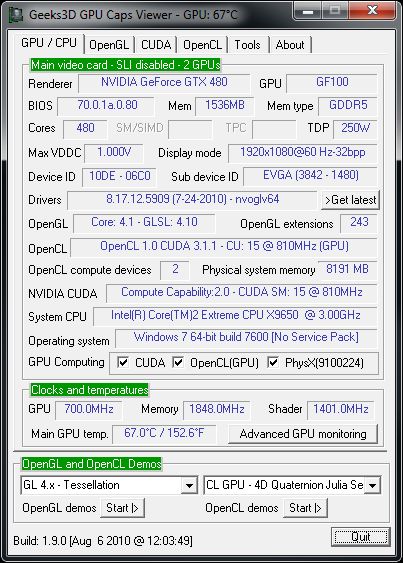
      ให้ใช้ โปรแกรมนี้ แทนคับ GPU Caps Viewer 1.9.3 เอาไว้ ตรวจ OpenCL โดยตรงเลย เพราะบางที ตัว GPUZ มันมี บัค ไม่โชว์ OpenCL นะ

      ใช้ตัวนี้ ชัวร์สุดคับ มีให้ทดสอบการรัน OpenCL ด้วยว่าใช้งานได้ ชัวร์ๆ คับ


      [GPU Tool] GPU Caps Viewer 1.9.3 With OpenGL 4 Tessellation Support ใหม่ล่าสุด

      Comment


      • Originally posted by THEFOOL View Post
        ให้ใช้ โปรแกรมนี้ แทนคับ GPU Caps Viewer 1.9.3 เอาไว้ ตรวจ OpenCL โดยตรงเลย เพราะบางที ตัว GPUZ มันมี บัค ไม่โชว์ OpenCL นะ

        ใช้ตัวนี้ ชัวร์สุดคับ มีให้ทดสอบการรัน OpenCL ด้วยว่าใช้งานได้ ชัวร์ๆ คับ


        [GPU Tool] GPU Caps Viewer 1.9.3 With OpenGL 4 Tessellation Support ใหม่ล่าสุด
        ถ้าขึ้นติ๊กถูกแบบนี้แสดงว่า เปิดแล้วใช่มั๊ยคะ ^ ^


        แล้วก็ ATI Stream Profiler 2.0 ที่เอามามันใช้สำหรับทำอะไรคะ แล้วจำเป็นกับ series 6xxx นี่มั๊ยคะ เพราะเห็นบอกว่า ATI Radeon HD 4000 or 5000 series

        ขอบคุณค่ะ สำหรับคำแนะนำ และคำตอบ จะติดตามผลงานเรื่อยๆนะคะ ^ ^

        Comment


        • ขอถามแบบโง่ๆ เลยไอที่ว่าแตกไฟล์ 10.10 ไปใส่ 10.10c มันทำยังไงหรอครับ ผมโหลดมามันก็เป็นตัว Setup ไม่มีตัว zip อะไรเลย

          Comment


          • เมื่อไหร่จะหมุด????

            Comment


            • Originally posted by ceberos64 View Post
              ขอถามแบบโง่ๆ เลยไอที่ว่าแตกไฟล์ 10.10 ไปใส่ 10.10c มันทำยังไงหรอครับ ผมโหลดมามันก็เป็นตัว Setup ไม่มีตัว zip อะไรเลย
              กด sutup แต่ไม่ต้องติดตั้งลงโปรแกรม คับ มันจะแตกไฟร์ ไปอยู่ในห้อง ati/support/... คับ

              หาไม่เจอ เอา ชื่อนี้ไป Search คับ ATIStreamSDK_Dev_win764a หรือ ATIStreamSDK_dev คับ สำหรับ 64 bit

              Comment


              • ขอบคุณมากครับ เด่วถ้าผมทำไม่ได้มาถามอีกได้มั้ยหรอครับ ^^

                Comment


                • ขอบคุณมากเรยครับ

                  Comment


                  • ผมลงไปแล้วทำไมเปิด ccc ไม่ได้ครับ 10.10c win7 32bit

                    Comment


                    • Originally posted by A.pato View Post
                      ผมลงไปแล้วทำไมเปิด ccc ไม่ได้ครับ 10.10c win7 32bit
                      ก่อนลง ไดวเวอร์ตัวใหม่ ลบตัวเก่าให้หมดไม่มีค้าง แล้วลองลงใหม่ดูคับ

                      ถ้าไม่หาย คงต้อง ลงวินโดว์ใหม่ น่าจะใช้งานได้ปรกติคับ

                      Comment


                      • I 5 @ 4.0
                        HD5850

                        ตอนนี้มาลองwin 7 อยากลอง Opencl +DX11 ทำไมเฟรมมันอยู่ 60 แล้วก็ลดลงด้วยนะปรับอุลตร้าทุกอย่าง 8aa ใช้ xp ยัง120กว่าแต่มันเป็น dx9 จอผม Resolution 1280*1024 เองอะ ลองลง ATI Stream Profiler แล้วมันมีประโยชน์อะไรหรอครับ

                        Comment


                        • Originally posted by ceberos64 View Post
                          I 5 @ 4.0
                          HD5850

                          ตอนนี้มาลองwin 7 อยากลอง Opencl +DX11 ทำไมเฟรมมันอยู่ 60 แล้วก็ลดลงด้วยนะปรับอุลตร้าทุกอย่าง 8aa ใช้ xp ยัง120กว่าแต่มันเป็น dx9 จอผม Resolution 1280*1024 เองอะ ลองลง ATI Stream Profiler แล้วมันมีประโยชน์อะไรหรอครับ
                          ปรับตามนี้หรือยังคับ


                          Comment


                          • ปรับแล้วครับท่าน เพื่อนผมก็ไม่เป็นหรือเป็นที่วินโดว์เปล่า * - -

                            Comment


                            • เฟรม lock นี้ แสดงว่า เปิด vsync on อยู่แน่ๆคับ

                              http://www.overclockzone.com/forums/...ครับ-)

                              ลองเข้าไปดูคับ

                              Comment


                              • good

                                Comment

                                Working...
                                X