Announcement

Collapse
No announcement yet.

Ssd กับ system Amd ได้แค่นี้ปรกติหรือไม่ปรกติครับ

Collapse
X
 
  • Filter
  • Time
  • Show
Clear All
new posts

  • Ssd กับ system Amd ได้แค่นี้ปรกติหรือไม่ปรกติครับ


    ถ้าวิ่งบน amd แล้วมันได้แค่นี้ผมจะได้กลับไป Wd black เหมือนเดิม ตอนนี้ไม่ได้รู้สึกต่างอะไรขึ้นมาเลย เต็มที่มันก็เร็วกว่าของเดิมประมาณ 5 วิไม่เกิน มีต้องแก้ตรงไหน รบกวนด้วยครับ

    Fx8120
    970 extreme 4 สาย sata III ก็เสียบรูที่ 1 ที่มันแยกต่างหากออกมาจาก 4 ช่องช่องที่ 2-3 เสียบไม่ได้ ติด psu ช่อง 4-5 เสียบ wd 3 tb กับ dvd อยู่ตอนนี้
    samsung 2133 8gb

  • #2
    ผิดปกติแล้วล่ะครับ

    ลองเช็คดูดีๆ ว่าเปิด AHCI และลง AMD Chipset Driver เรียบร้อยรึยังนะครับ
    Download drivers and software for AMD products — includes Windows and Linux support, auto-detect tools & detailed guides for installation.


    ถ้าปรับถูกแล้ว จะขึ้นเป็น SATA ตามนี้


    อันนี้ Vertex 2 SATA2 บน AMD ครับ

    Comment


    • #3
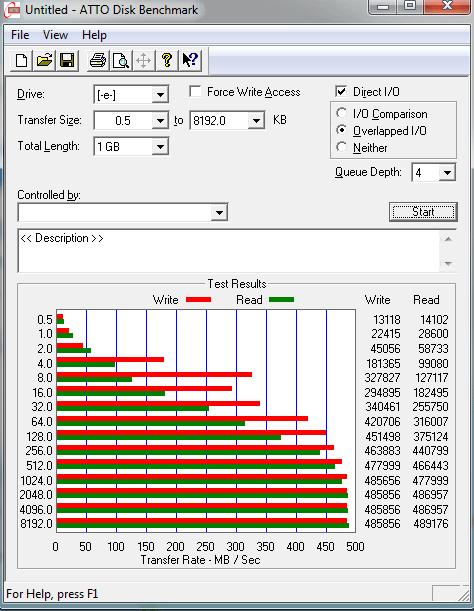
      อย่าเทส ATTO สิครับ โปรแกรมนี้เกรียนที่สุดใน 3 โลก

      เทส as-ssd เท่านั้นครับ

      Atto โปรแกรมเทสเกรียนที่สุด มั่วที่สุด hdd-tune มันใช้สำหรับ harddisk ชื่อมันก็บอกแล้ว ไม่ใช่ ssd-tune ซะหน่อยนะครับ


      ถ้าจะเทส SSD ใช้ As-SSD ครับ


      โหลดที่นี่ แล้วรันเลย http://www.alex-is.de/progs/AS%20SSD%20Benchmark.zip

      Comment


      • #4
        ผมแนะนำว่า ให้ Secure Erase ก่อน แล้วลง Windows ใหม่ครับ Amd ไม่ใช่แก๊สโซฮอร์นะครับ อย่าโทษ AMD อาการแบบนี้ ต้อง Replace User ครับ


        แนะนำ ให้ทำ Secure Erase ก่อนตามกระทู้นี้ http://www.overclockzone.com/forums/...1#post35774969

        WB Black กับ vertex 4 เทียบกันไม่ติดอยู่แล้วครับ vertex 4 แรงกว่าคนละโลกกันเลย แต่ User เซ็ตไม่ถูก อย่าโทษ SSD และ AMD ครับ


        ตามเสต๊ปเลยนะครับ

        1. เข้า Bios ปรับเป็น AHCI ก่อน แล้วเปิด AMD AHCI BIOS ด้วย

        2. ลงกันจนเน่าแล้ว แนะนำให้ลง windows ใหม่ แต่เดี๋ยวก่อน Secure Erase รอบนึงนะครับ Format ธรรมดาใช้กับ SSD ไม่ได้ มันไม่เกลี้ยง ใช้ Parted Magic ทำ secure erase นะครับ ตามนี้เลย (ขอบคุณท่านแมวสำหรับ Guid นะครับ )


        Originally posted by Zyxzenze View Post
        ลองดูไกด์จาก Corsair เอง.. แล้วดูว่าทำตามถูกต้องมั้ย ให้อีกที่นึง อ่ะ... (อันบนลิงค์ OCZ)
        _______________________________________________________

        How To Secure Erase Corsair SSDs With Parted Magic


        By Mike Clements, on November 11th, 2010
        SSDs require different methods of maintenance from standard hard disk drives. One of the most commonly performed actions is to secure erase the drive. A secure erase differs from a format, and is the only way to completely erase a solid-state drive..
        Corsair Force Series solid-state hard drive

        The most common and user friendly tool we have found for secure erasing SSDs is Parted Magic, an open source tool that is free to download and use. Parted Magic is a standalone partitioning tool and requires no operating system to use. It can be run from any bootable media of sufficient capacity, including Corsair?s Ultimate Bootable USB Flash Drive.
        Once you have your bootable media prepared, load Parted Magic and select option 1 at the first menu as seen below:
        The next two steps involve selecting the Erase Disk function, and then specifying the method of secure erasing. Once you have arrived at the main screen, you?ll need to go to System Tools and select Erase Disk as seen here:
        Next, select the Internal: Secure Erase option which will write zeroes to your entire data area:
        This step is where you select the disk that you want to erase. Be sure to select the correct disk!
        Some drives indicate that they have a password requirement. Select NULL to bypass this and select OK as seen below:
        Verify the command to erase the selected drive as illustrated below. Once this command is verified all data will be lost, and cannot be retrieved. You will see a message stating that the operation may take a certain amount of time to complete. Most SSDs will fully secure erase in only a matter of seconds:
        Here are some additional resources that may be helpful. Thank you for choosing a Corsair SSD!
        Corsair Ultimate Bootable USB Flash Drive Tool
        Corsair How To Guides and Videos
        Download Parted Magic
        This document can be found in PDF format Here.

        ก็อปมาทั้งดุ้นจาก
        http://blog.corsair.com/?p=4484


        3. ลง windows ใหม่

        4. ลง AMD sata AHCI Driver ครับ

        5. ลง Driver ต่างๆให้ครบ

        6. ทดสอบด้วย As-SSD ดูครับ http://www.alex-is.de/progs/AS%20SSD%20Benchmark.zip

        7. AMD ก็วิ่ง 400+ ได้เหมือน intel ครับ ขอแค่ USER อย่า ERROR แบบนี้ก็พอครับ สวัสดีครับ

        Comment


        • #5
          Secure Erase ก่อนลง windows แล้วครับ

          จากนั้นก็ไปปรับ AHCI ใน bios m/b

          แล้วก็ลง windows ครับ

          AMD sata AHCI Driver ยังไม่ได้ลงเดี๋ยวขอลองก่อนนะครับ ^^

          Comment


          • #6
            แปะ direct link ให้เลยแล้วกัน http://www2.ati.com/drivers/12-8_vis...8_32-64_sb.exe ^^


            เทส AS-SSD เท่านั้นนะครับ

            Comment


            • #7
              กับ FW 1.4 ผมได้ประมาณนี้ ...ยังไม่ได้ up เลยครับ
              บอร์ด C5F

              Comment


              • #8
                วิธีทำกับโปรแกรมที่ใช้ทดสอบท่านบนๆบอกไปหมดแล้ว ผมตามเข้ามาดูเฉยๆ

                ถ้าจะเอามาเทส ATTO ต้อง Agility 3 ครับ เมพสุดใน 3 โลก


                ส่วนอันนี้เอา AS SSD เทส อายครับ... กดเข้าไปดูเองละกัน

                ใช้จริงวิ่งช้ากว่านี้อีก
                Last edited by Beaver_XT; 12 Oct 2012, 22:32:03.

                Comment


                • #9
                  ลองทำตามข้างบนว่าลง driver AHCI แล้ว restart ได้เพิ่มมาอีกหน่อย

                  Comment


                  • #10
                    ทำยังไงให้เกิน 400 mb เต็มที่เลย 278 mb กดกี่ทีไม่เคยเกินครับ

                    Comment


                    • #11
                      ลองโปรแกรมนี้ครับ AS-SSD

                      Comment


                      • #12


                        อย่างนี้พอได้มั้ยครับ


                        เอาไปเครมดีมั้ยครับอยู่ใกล้บ้าน แต่จะบอกเค้าว่าอะไรดี
                        Last edited by Figaro; 13 Oct 2012, 09:20:03.

                        Comment


                        • #13
                          ถ้ายังสนใจเลข HD Tune
                          ก็ปรับ Block Size เป็น 8MB ก่อนเทส

                          Comment


                          • #14
                            โปรแกรมมันก็บอก ว่า HD TUNE เอาไว้ทดสอบ HD ส่วน AS SSD เอาไว้ทดสอบ SSD ครับ

                            ใช้ของให้เป็นครับ ห้อง Mem มาม่ากันเยอะพอแล้วครับ

                            Comment


                            • #15
                              คุณใช้ SSD ก็ต้องใช้ as ssd ในการเทสนะครับ เลือกใช้งานให้ถูกด้วย
                              HD tune นั้น เหมือนท่าน V-FrIeNd ว่าปรับ Block Size เป็น 8MB ก่อนเทส

                              ไม่งันท่านก็จะโดนว่า user error สุดๆไปเลย
                              และถ้าท่านยังไม่เชื่อใน AS SSD ยังเถียงก็จะมีคนว่าท่านขายทิ้งและไปเล่นฝั่งนู้นไป๋ เชืี่อผมทำอะไรต้องใจเย็นๆไว้ก่อน

                              Comment

                              Working...
                              X