
 Tweet
Tweet
Operation Flashpoint RedRiver Online with Tunngle !!
วิธีนะครับ
Step by step TUNNGLE instructions for host and client (assuming you have red river installed and the latest Teknogods Beta 20):
1. First of all go to the Operation Flashpoint Red River Tunngle lobby.
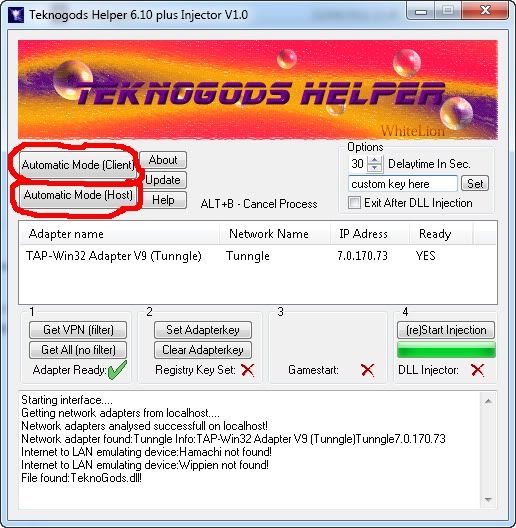
2. Run Teknohelper. If you are the host, click Automatic Mode (Host) and wait for the beeps to finish then run the game. If you are connecting to a host, click Automatic Mode (client) and wait for the beeps to finish then run the game.
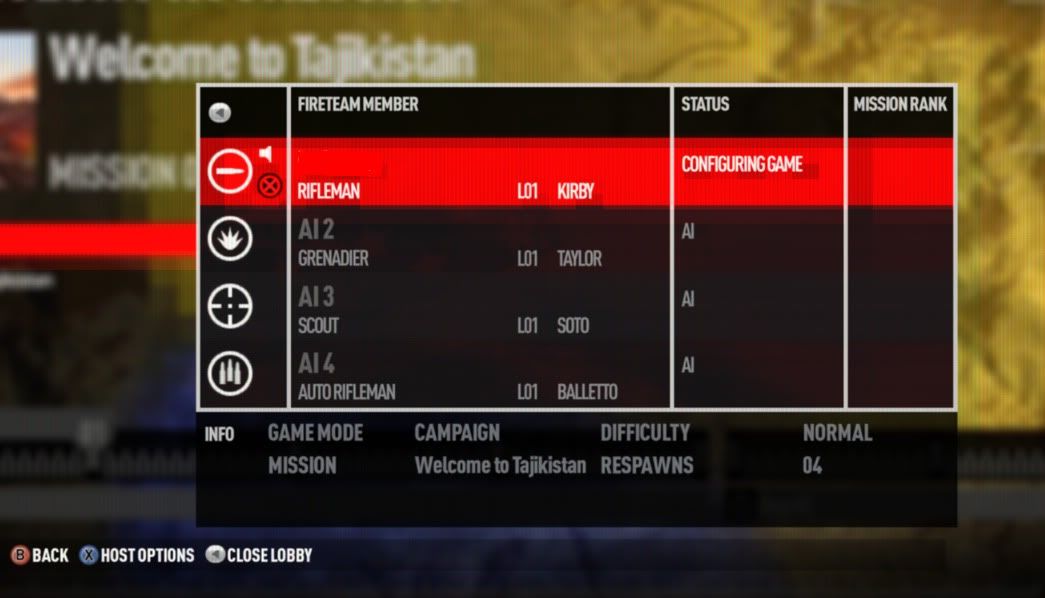
As the host, you need to set up LAN mode properly. Let's assume you are playing campaign mode. Select Campaign mode, and before you start the game you must open the game lobby by pressing TAB.
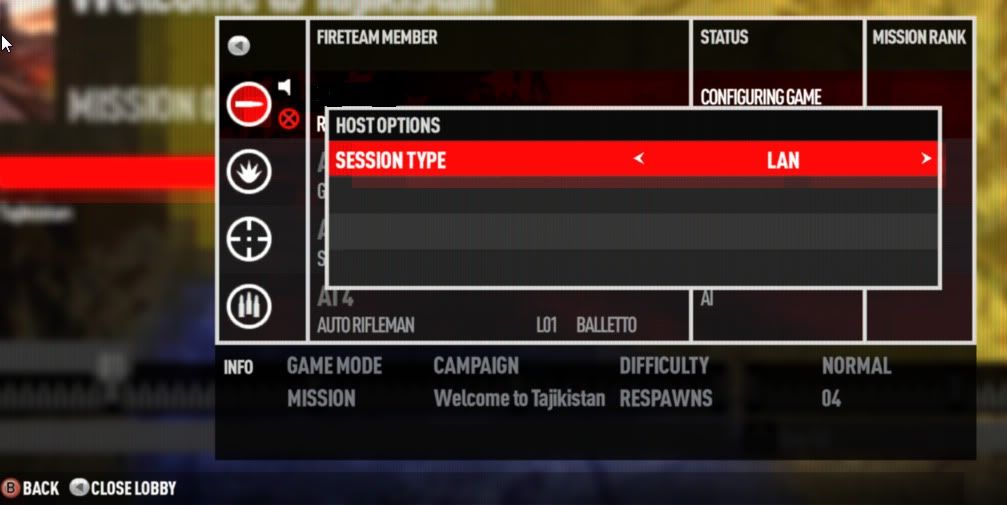
3. Now press F1 for hosting options, change the session type to LAN and then PRESS ENTER! That last part is important. If you don't press ENTER, it won't actually create a LAN session at all.
Ok so now you have a session up, people can connect.
4. If you are a client, here's what you do. From the main menu, go to join game. Make sure that session type is set to LAN (it's at the bottom of the filter list on screen).
5. Now select Browse Servers. You will see all of the Tunngle servers currently running.
Before you try to connect, you have to press the F12 key. You should hear a voice say "Working". If you don't hear the voice, press F12 again. When you do hear it, join the game of your choosing and as soon as it connects press F12 again until you hear a voice say "Transfer Complete". Sometimes you have to press F12 more than once to get the "Transfer Complete" message.
It's all about timing here. If you are too fast pressing F12 the second time, it will fail. If you are too slow it will fail.
Remember the order is F12, Join game, F12, and you're done. The host never has to press F12 at all, only the clients must do this.
When you eventually get the timing right, you can play the game.
Have fun
credit by knivestv from Teknogods
พอเข้าถึงหน้า ค้นหา server และเห็น server แล้ว ก็กด F12 จะได้ยินว่า working จากนั้นก็ join server พอถึง lobby ก็ กด F12 อีกที จะได้ยินว่า Transfer Complete จากนั้นรอเริ่ม
วิธีนะครับ
Step by step TUNNGLE instructions for host and client (assuming you have red river installed and the latest Teknogods Beta 20):
1. First of all go to the Operation Flashpoint Red River Tunngle lobby.
2. Run Teknohelper. If you are the host, click Automatic Mode (Host) and wait for the beeps to finish then run the game. If you are connecting to a host, click Automatic Mode (client) and wait for the beeps to finish then run the game.
As the host, you need to set up LAN mode properly. Let's assume you are playing campaign mode. Select Campaign mode, and before you start the game you must open the game lobby by pressing TAB.
3. Now press F1 for hosting options, change the session type to LAN and then PRESS ENTER! That last part is important. If you don't press ENTER, it won't actually create a LAN session at all.
Ok so now you have a session up, people can connect.
4. If you are a client, here's what you do. From the main menu, go to join game. Make sure that session type is set to LAN (it's at the bottom of the filter list on screen).
5. Now select Browse Servers. You will see all of the Tunngle servers currently running.
Before you try to connect, you have to press the F12 key. You should hear a voice say "Working". If you don't hear the voice, press F12 again. When you do hear it, join the game of your choosing and as soon as it connects press F12 again until you hear a voice say "Transfer Complete". Sometimes you have to press F12 more than once to get the "Transfer Complete" message.
It's all about timing here. If you are too fast pressing F12 the second time, it will fail. If you are too slow it will fail.
Remember the order is F12, Join game, F12, and you're done. The host never has to press F12 at all, only the clients must do this.
When you eventually get the timing right, you can play the game.
Have fun
credit by knivestv from Teknogods
พอเข้าถึงหน้า ค้นหา server และเห็น server แล้ว ก็กด F12 จะได้ยินว่า working จากนั้นก็ join server พอถึง lobby ก็ กด F12 อีกที จะได้ยินว่า Transfer Complete จากนั้นรอเริ่ม


Comment